
 Sessionize
 Aviva Solutions
 Fluent Assertions
PackageGuard can now fail your build on risk scores and package age
Why I wanted more than a report
In my previous post, I explained how PackageGuard calculates the risk of every open-source dependency in your code base. It gives every package a legal, a security and an operational score and generates a HTML report with all the evidence behind those scores. I’m quite proud of that report. But I also know how it goes in most projects. Somebody opens the report once, thinks “interesting”, and then never looks at it again.
I’ve seen the same thing happen with compiler warnings. For years, the teams I worked with accepted hundreds of them. Only after we decided to treat warnings as errors did people really start to care. So I wanted PackageGuard to do the same for risk. If a package is too risky, the build should fail.
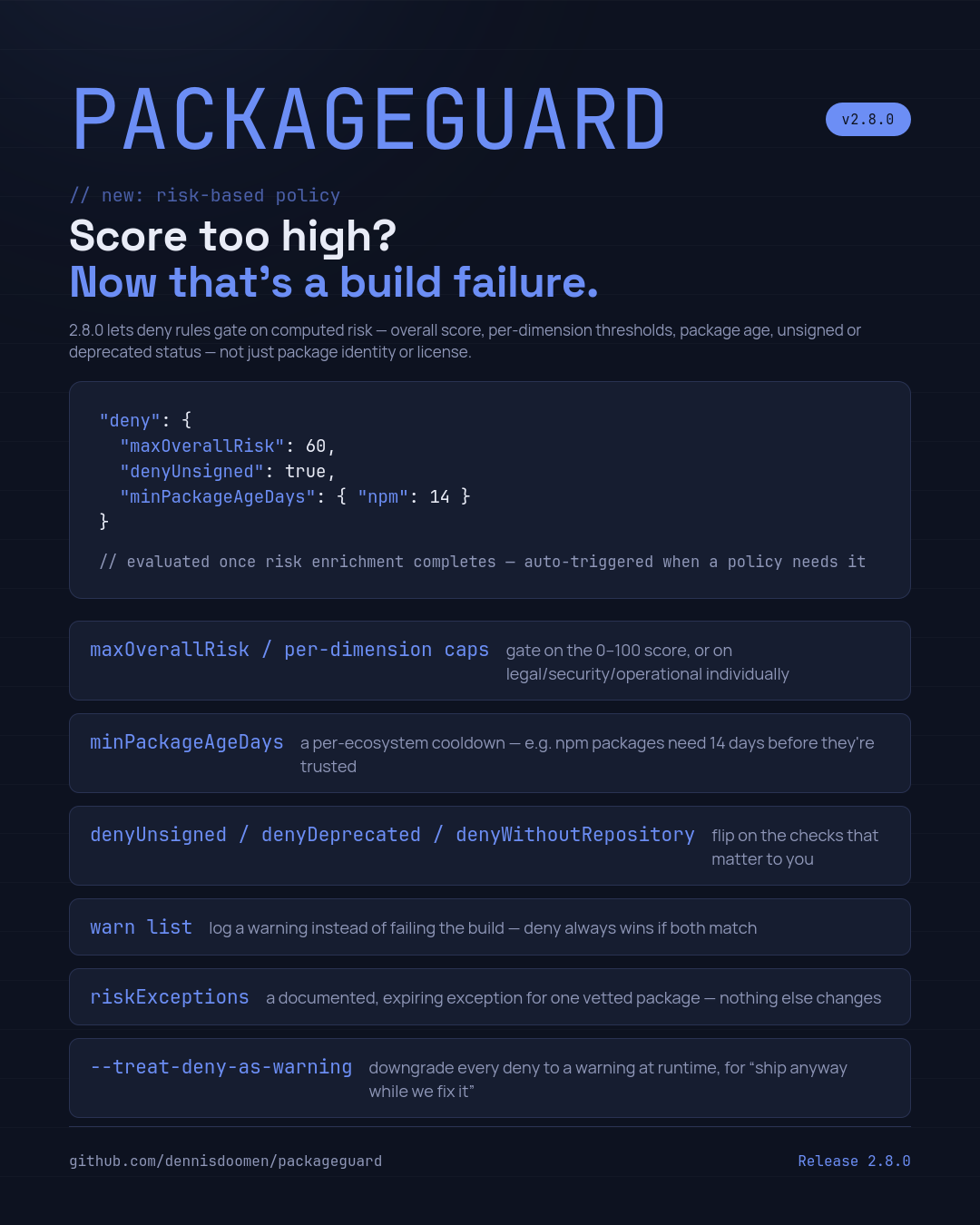
Up to now, you could only deny a package based on its name, its version or its license. With pull request #262, which implements feature request #212 (policies based on risk data), you can now also deny packages based on their risk scores, their age and a couple of other signals. Next to that, I added a way to accept a specific risk on purpose, a section for rules that should only give a warning, and a switch for those moments where a new vulnerability breaks your build and you can’t fix it yet.
The new deny rules
All the new rules go in the existing deny section of your packageguard.config.json or .packageguard/config.json. This is what a full example looks like:
{
  "settings": {
    "deny": {
      "maxOverallRisk": 60,
      "maxLegalRisk": 5,
      "maxSecurityRisk": 7,
      "maxOperationalRisk": 8,
      "maxOsvSeverityScore": 7.0,
      "denyUnsigned": true,
      "denyDeprecated": true,
      "denyWithoutRepository": true,
      "minPackageAgeDays": { "npm": 14, "nuget": 3 }
    }
  }
}
Let me go through them one by one.
maxOverallRiskdenies a package if its overall risk score (0 to 100) is higher than the value you specify. So60means that everything in the red zone of the report fails the build.maxLegalRisk,maxSecurityRiskandmaxOperationalRiskdo the same for the individual dimensions, which use a score of 0 to 10. I added these because the overall score is a weighted combination of the three. A package can be very badly maintained and still end up below yourmaxOverallRisk. With these settings you can be much more specific.maxOsvSeverityScorelooks at the most severe known vulnerability of the package in OSV, the open vulnerability database. It uses the CVSS score, which is the standard scale from 0 to 10 for the severity of a vulnerability. If you use7.0, anything rated as “High” or “Critical” will fail the build, regardless of the rest of the security score.denyUnsigneddenies packages that are not signed by their publisher. For npm packages, PackageGuard can’t check the signature yet. In that case, it will not deny the package, because it can’t prove that the package is unsigned.denyDeprecateddenies packages that the registry marked as deprecated.denyWithoutRepositorydenies packages that don’t tell you where their source code lives.minPackageAgeDaysdenies any version that was published less than a certain number of days ago. You can specify a different number for each ecosystem.
You don’t have to pass --report-risk for this to work. As soon as your policy contains one of these rules, PackageGuard will collect the risk data automatically and log a message about that. Otherwise it would have nothing to compare your thresholds with. Just be aware that collecting that data means calling the GitHub and OSV APIs a lot, so I would definitely combine this with --use-caching.
Why the age of a package is so important
Of all these rules, minPackageAgeDays is probably the simplest one. But in my opinion, it’s also one of the most effective.
If you look at the supply chain attacks on npm from the last few years, a lot of them follow the same pattern. An attacker gets access to the account of a maintainer and publishes a new version that contains malicious code. Somebody in the community notices it and the registry removes that version within hours. The only teams that get hurt are the ones that happened to install the package in those few hours.
Now, if your policy says that an npm package must be at least 14 days old, you’ll never install that version in the first place. You simply let other people use it for two weeks first. The price you pay is small. You get new features and bug fixes a bit later, that’s all. For NuGet, where packages can be signed and this kind of attack is less common, I think 3 days is enough.
Accepting a risk on purpose
As soon as you start to use live risk data in your build, something changes. Your build can pass today and fail tomorrow, even if nobody touched the code. Maybe a new CVE was published, or the maintainer stopped responding to issues and the operational score went up. Well, that’s exactly what you asked for. But sometimes you look at the finding and decide that the risk is acceptable for your situation. For instance, because the vulnerability is in a part of the package that you don’t use.
That’s why I added the riskExceptions section:
{
  "settings": {
    "riskExceptions": [
      {
        "package": "left-pad",
        "reason": "Vetted manually on 2026-01-15. CVE-2025-12345 does not apply to our usage.",
        "expiresOn": "2026-07-01"
      },
      {
        "package": "some-native-lib",
        "versions": "[1.0.0,2.0.0)",
        "reason": "Signing certificate expired, but we verified the publisher separately."
      }
    ]
  }
}
Each exception has a package name (wildcards are supported), an optional version range, a reason and an optional expiry date. There are a few things I want you to know about this.
First of all, an exception only excludes a package from the risk-based rules. It will never change the normal allow and deny rules for packages and licenses. So you can’t use it to get a GPL-licensed package in through the back door.
Second, please take the reason seriously. It’s the only documentation the next developer has when he or she wonders why this package is allowed.
And third, when the expiresOn date has passed, the exception no longer applies. If the package still violates one of the rules, the build will fail again. I would always set an expiry date. It forces somebody to look at the decision again after a while.
Warnings instead of failures
Not everything needs to break the build. Some things are good to know about, but not important enough to stop a release. For those situations, there’s a new warn section. It supports the same packages, licenses and prerelease options as the deny section, but will only log a warning.
{
  "settings": {
    "warn": {
      "licenses": ["GPL-3.0"],
      "packages": ["some-package"]
    }
  }
}
If a package matches both the deny and the warn section, the deny rule wins. I also think this section is a nice way to introduce a new rule to your teams. Start with a warning, give everybody some time to clean up their dependencies, and move the rule to deny after that.
What to do when a zero-day vulnerability breaks your build
This brings me to the scenario that made me add the last part of this feature. Imagine it’s Monday morning and all your pipelines are red. During the weekend, somebody published a critical vulnerability in a popular logging library, and there’s no patched version yet. That’s what we call a zero-day vulnerability. Your maxOsvSeverityScore rule is doing exactly what it was designed for. But you also have an important production fix that needs to go out today. So what do you do?
You have two options.
The first option is to add a risk exception. If you know which package is causing the problem, this is what I would do. Add it to riskExceptions with a clear reason and an expiry date a few days or weeks from now. Only that package will be excluded, and only from the risk-based rules. All your other rules keep working. And if you don’t know which rule or which dependency is responsible, run packageguard explain <package-name>. As part of this change, it now also shows whether a package is denied, excluded or only produces a warning because of the new risk rules. It also shows the chain of direct dependencies that pulled it in, so you know what to upgrade later.
The second option is to downgrade all deny violations to warnings. Sometimes you don’t have the time to investigate, or multiple packages are affected at the same time. For those situations, you can pass --treat-deny-as-warning on the command-line or set the PACKAGEGUARD_DENY_AS_WARNING environment variable. PackageGuard will still report all violations, but as warnings, so your build can continue.
In practice, I prefer the environment variable, because you don’t need to change the pipeline itself. Just defining the variable is enough to enable it. Only if you set it to false (case doesn’t matter), it’s explicitly disabled.
In GitHub Actions, you can connect it to a repository variable. That allows you to enable and disable it from the repository settings without making a commit:
jobs:
  build:
    runs-on: ubuntu-latest
    env:
      PACKAGEGUARD_DENY_AS_WARNING: $
    steps:
      - uses: actions/checkout@v4
      - run: dotnet tool install --global PackageGuard
      - run: packageguard --use-caching
In Azure Pipelines it’s even easier. Pipeline variables that are not secret are automatically exposed as environment variables. So you can just add a variable named PACKAGEGUARD_DENY_AS_WARNING to a single run, or to the pipeline settings, and remove it again later.
But I have to warn you. This switch downgrades all deny rules, not just the one that caused the problem. That includes your license rules and the packages you explicitly banned. As long as it’s enabled, a new problem can enter your code base without anybody noticing. So please use it only as a temporary solution. Enable it for as short as possible and only for the pipelines that really need to release. Create an issue that explains why it’s enabled and when you expect to disable it again. As soon as you know which package is causing the failures, replace the switch with a specific risk exception with an expiry date. And when a patched version becomes available, upgrade and remove the variable.
Some details you should know
The new rules also work together with the hierarchical configuration I described in my previous post. For the numeric thresholds, a project-level configuration file only overrides the solution-level value if it actually defines that setting. So if the solution-level file sets maxOverallRisk to 60, a project-level file without that setting will not remove it. The boolean settings like denyUnsigned behave in the same way as prerelease already did. The most specific file wins.
Every violation now also includes the reason behind the rule that caused it, and whether it’s a warning or an actual failure. I hope that makes the output easier to understand for developers who didn’t write the policy themselves.
Where to go from here
So with this change, PackageGuard doesn’t just tell you about the risk anymore. It can now also enforce your decisions in every build. If you want to try it, I would start with a warn section and a relatively high maxOverallRisk. I would also add minPackageAgeDays for npm right away, because it hardly costs you anything. After that, you can make the rules stricter once your teams are used to them. And the next time a zero-day vulnerability shows up, you have a documented and temporary way to keep releasing without disabling the entire check.
PackageGuard is free and MIT licensed. You can find the full configuration reference on packageguard.org, and the source code and open feature requests on GitHub. And if you’re missing a rule, please open an issue. Most of what I described in this post started like that.
About me
I’m a Microsoft MVP and Principal Consultant at Aviva Solutions with 28 years of experience under my belt. As a coding software architect and/or lead developer, I specialize in building or improving (legacy) full-stack enterprise solutions based on .NET as well as providing coaching on all aspects of designing, building, deploying and maintaining software systems. I’m the author of Fluent Assertions, a popular .NET assertion library, Liquid Projections, a set of libraries for building Event Sourcing projections, and I’ve been maintaining coding guidelines for C# since 2001. You can find me on Twitter, Mastodon and Blue Sky.
Leave a Comment