
 Sessionize
 Aviva Solutions
 Fluent Assertions
PackageGuard: know what you are really pulling into your codebase
Every time you run npm install or add a NuGet reference, you invite a stranger into your codebase. That stranger might be well maintained and safe. It might also be abandoned, badly licensed, or carrying a known vulnerability three levels deep in its own dependencies. Most teams find out the hard way: a security scan flags something in production, or a legal review stalls a release because nobody can say which license a transitive package uses.
That gap is why I built PackageGuard, a fully open-source CLI tool. It scans the NuGet, npm, pnpm and Yarn dependencies of your codebase, checks them against rules you define, scores their risk, and can produce a full bill of materials. All of that runs from a single command that fits into any CI pipeline.
What PackageGuard actually does
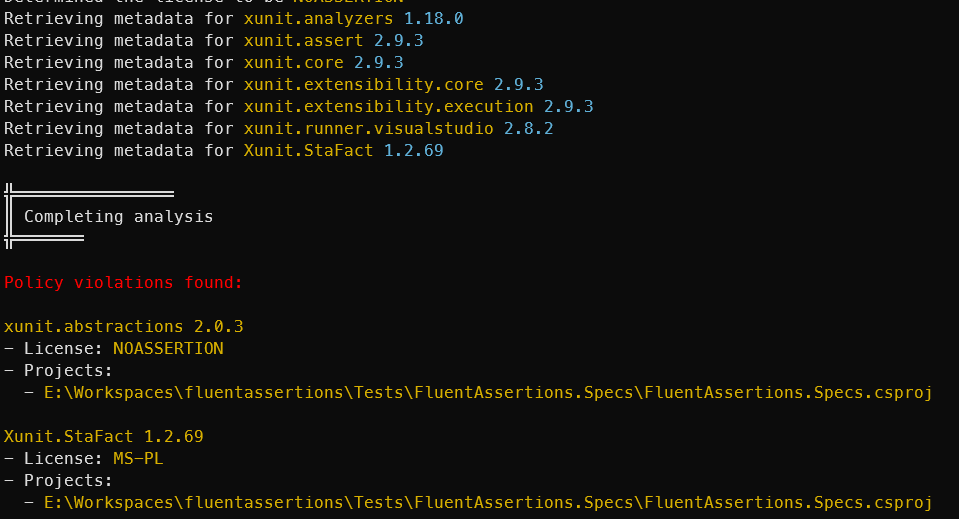
At its core, PackageGuard reads every dependency in your solution or codebase, direct and indirect (also called “transitive” — a dependency your dependency needs, not one you added yourself), and checks it against an allow- and deny-list. You can:
- Allow or deny specific open-source licenses, using standard SPDX names like
MITorApache-2.0 - Allow or deny specific packages, or specific version ranges of a package
- Allow or deny specific package feeds, for example an internal Azure DevOps feed
Rules live in a JSON configuration file. PackageGuard finds these files automatically, at the solution level and at the project level, and merges them. That means you can set a company-wide policy once, and let individual projects add their own exceptions.
To find out a package’s license, PackageGuard checks several sources in order: the package’s own registry metadata (NuGet or npm), then its GitHub repository, and finally the downloaded license text itself, if nothing else answers the question. If one source has no answer, it falls back to the next one instead of giving up.
Making you conscious of the risk, not just the license
License checking answers a legal question. It does not tell you whether a package is well maintained, actively patched, or safe to trust. That is what the --report-risk flag adds.
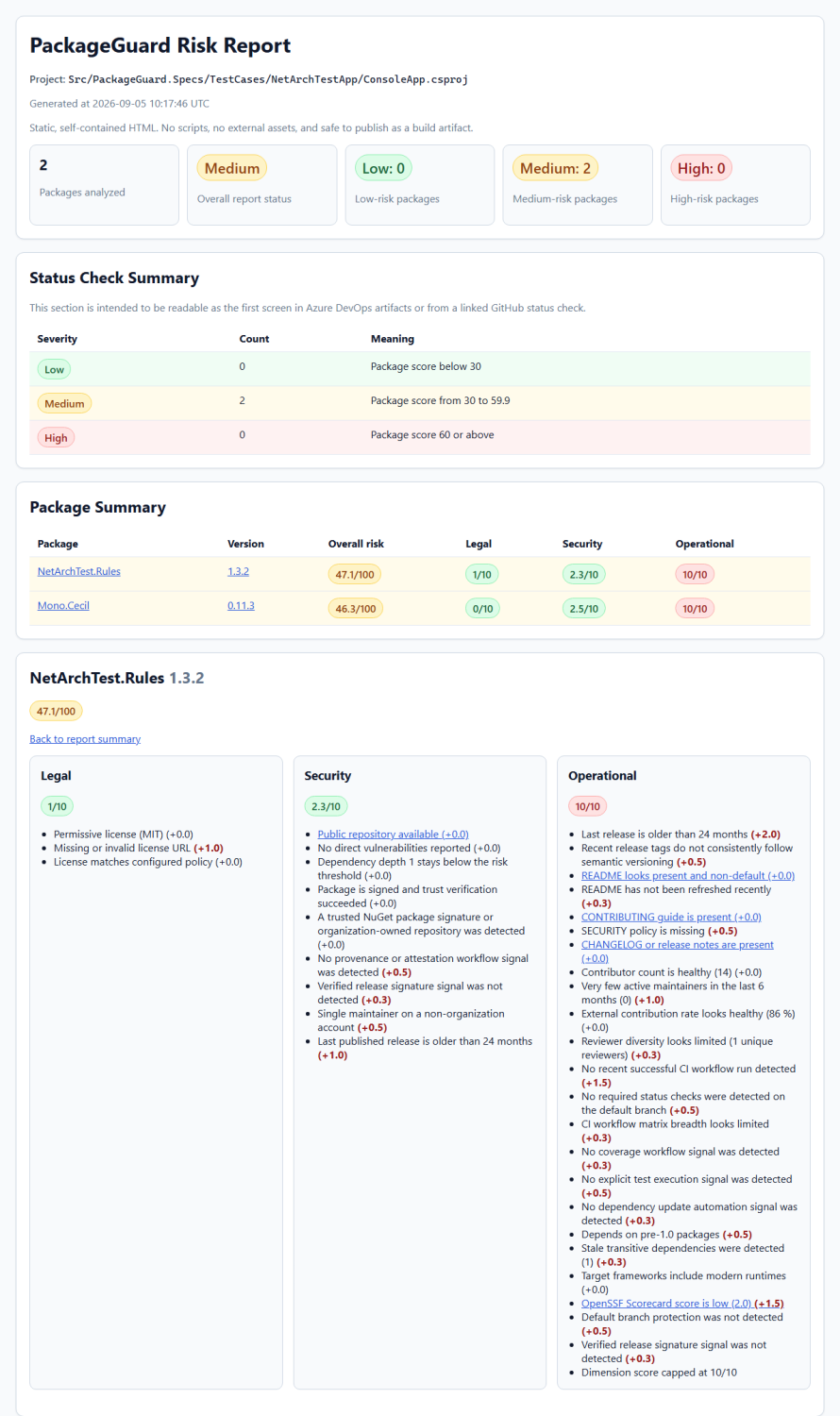
PackageGuard scores every package across three dimensions:
- Legal risk (20% weight) — is there a valid license, and does it fit your policy?
- Security risk (45% weight) — does it or its dependencies have known vulnerabilities, is it signed, does it have a clear security policy?
- Operational risk (35% weight) — is it actively maintained, does it have real release notes, how many people maintain it, how fast do they respond to issues?
Each dimension gets a score from 0 to 10. The total score is weighted, not averaged, and scaled to 0–100. A green score (0–29.9) means low risk, yellow (30–59.9) means medium risk, and red (60–100) means high risk.
What makes this useful in practice is the amount of detail behind each score. PackageGuard checks dozens of signals: whether commits are cryptographically verified, whether the maintainer team is one person on a personal account, whether open bugs stay unresolved for a long time, whether CI runs are green, and more. None of these signals decide risk alone. Together, they build a picture you can actually act on.
The output comes in three forms:
- A colored summary in your console, so you can see risk at a glance during a normal run.
- A self-contained HTML report, with no external scripts or assets, so you can open it anywhere and share it safely. Every package gets its own card with the score, the reasoning behind it, and an Evidence section listing the exact vulnerability IDs, versions, and dates behind that reasoning — collapsed by default, so the report stays readable even when the evidence list is long.
- A SARIF file, the format GitHub code scanning understands, so risk findings can show up directly in your pull requests.
That third point matters. A risk score that only lives in a console log gets ignored. A risk score that shows up as a code-scanning annotation on a pull request gets a second look.
Unique features worth knowing about
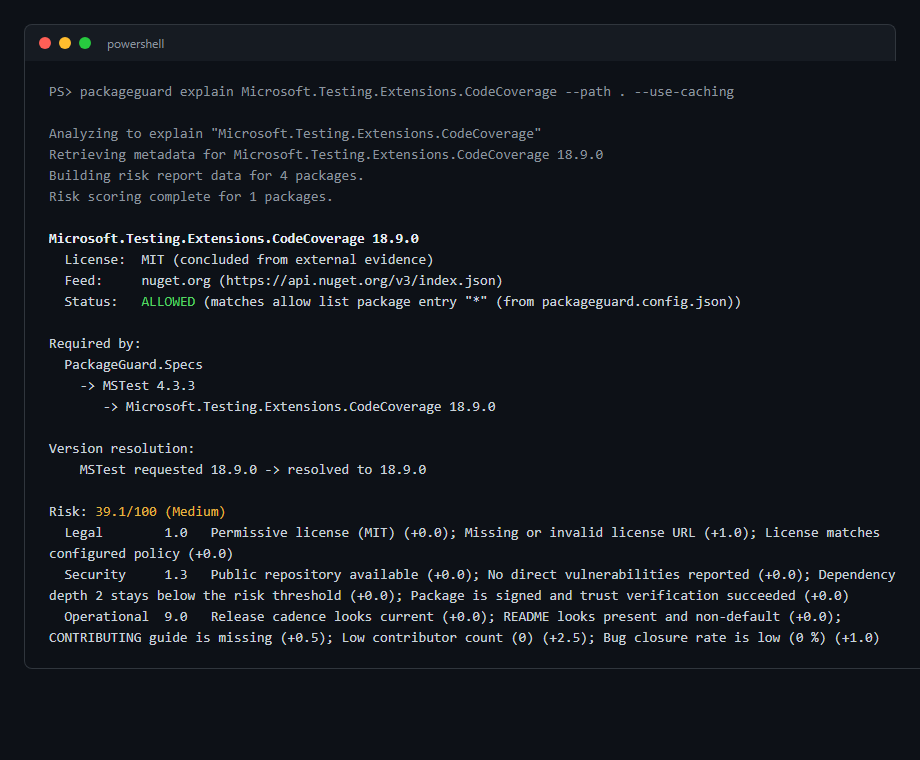
The explain command. This is the feature I reach for most myself. When a violation shows up on a package you have never heard of, three levels deep in your dependency tree, the normal scan output does not tell you what to do about it. Run packageguard explain <package-name> and it tells you the resolved version and license, which allow or deny rule decided its fate and which config file that rule came from, the exact chain of direct dependencies that pulled it in (so you know which package to upgrade to make the problem go away), and its full risk breakdown. The name does not even need to be exact — a partial or misspelled name gets matched against everything in your solution, with suggestions if it is still ambiguous.
Software Bill of Materials (SBOM) generation. With --sbom cyclonedx or --sbom spdx, PackageGuard emits a standards-compliant dependency graph in the format your compliance or security team likely already expects. It records package URLs for every component, marks each dependency as direct or transitive, and — this is a small detail I care about — clearly distinguishes a license that a package declares about itself from one PackageGuard concluded from other evidence, so nobody mistakes a guess for a fact. Combine --sbom with --report-risk and the SBOM also carries vulnerability data from OSV, the open vulnerability database.
Caching that respects your time. License and risk lookups often mean calling GitHub’s API, which is slow and rate-limited. The --use-caching flag stores everything PackageGuard learns about a package in a local cache file. You can commit that file to source control, so your whole team and your CI pipeline reuse the same data. Risk data refreshes automatically after 24 hours by default, and you can tune that window or force a refresh whenever you want fully current numbers.
Hierarchical configuration. Large codebases rarely want one single policy. PackageGuard looks for configuration files at the solution level first, then at the project level, and merges what it finds — booleans from the more specific file win, while lists like allowed licenses or packages get combined. That lets you set sensible defaults company-wide and still allow a specific project its own exception, without duplicating the whole policy file everywhere.
What’s coming next
The issue tracker shows a steady stream of small, concrete improvements rather than one big rewrite, which is exactly how a tool like this should grow. Two recent examples: the explain command itself started as a feature request, and a follow-up request made the risk report name the exact vulnerability IDs and package versions behind each finding, instead of just showing a count. Both shipped within weeks of being proposed.
The biggest gap still open is one PackageGuard is upfront about in its own documentation. Right now, the tool only builds a real parent-child dependency graph for NuGet. For npm, Yarn and pnpm, it records every package as a flat, direct dependency of your solution instead of showing which package pulled in which. That gap matters, because commercial tools like Snyk and Blackduck do build that full graph for every ecosystem they support, and it is exactly what lets explain point at the one direct dependency you actually need to upgrade. Closing it is the clearest next step toward matching what the expensive tools already do, at every layer, not just for .NET projects.
Why this matters
None of this replaces good judgment. A red risk score does not automatically mean “do not use this package.” It means “look closer before you trust it.” That is really the whole point: most teams add dependencies without thinking about them at all, the same way most of us used to accept compiler warnings until we decided to fail the build on them (see lesson 4 from my earlier post on coding lessons). PackageGuard exists to put that decision back in front of you, with real evidence behind it, before the risk becomes an incident.
PackageGuard is free, MIT licensed, and works as a .NET global tool or as a portable cross-platform deployment, so it fits into any CI system without a special plugin. The full documentation lives at packageguard.org, and the source, including the open feature requests, is on GitHub.
About me
I’m a Microsoft MVP and Principal Consultant at Aviva Solutions with 28 years of experience under my belt. As a coding software architect and/or lead developer, I specialize in building or improving (legacy) full-stack enterprise solutions based on .NET as well as providing coaching on all aspects of designing, building, deploying and maintaining software systems. I’m the author of Fluent Assertions, a popular .NET assertion library, Liquid Projections, a set of libraries for building Event Sourcing projections, and I’ve been maintaining coding guidelines for C# since 2001. You can find me on Twitter, Mastodon and Blue Sky.
Leave a Comment