<?xml version="1.0" encoding="utf-8"?><feed xmlns="http://www.w3.org/2005/Atom" ><generator uri="https://jekyllrb.com/" version="3.10.0">Jekyll</generator><link href="https://www.dennisdoomen.com/feed.xml" rel="self" type="application/atom+xml" /><link href="https://www.dennisdoomen.com/" rel="alternate" type="text/html" /><updated>2026-05-15T10:25:32+00:00</updated><id>https://www.dennisdoomen.com/feed.xml</id><title type="html">Dennis Doomen</title><subtitle>On an everlasting quest for better solutions</subtitle><author><name>Dennis Doomen</name><email>dennis.doomen@avivasolutions.nl</email></author><entry><title type="html">Kickstarting your libraries with the .NET Library Starter Kit</title><link href="https://www.dennisdoomen.com/2025/06/library-starter-kit.html" rel="alternate" type="text/html" title="Kickstarting your libraries with the .NET Library Starter Kit" /><published>2025-06-17T00:00:00+00:00</published><updated>2025-06-17T00:00:00+00:00</updated><id>https://www.dennisdoomen.com/2025/06/library-starter-kit</id><content type="html" xml:base="https://www.dennisdoomen.com/2025/06/library-starter-kit.html"><![CDATA[<p>While starting a bunch of new open-source projects, I found myself repeatedly copy-pasting boilerplate code from <a href="https://fluentassertions.com/">FluentAssertions</a>, a (partially) open-source project with over half a billion downloads. That made me realize there must be a smarter way to encapsulate all that knowledge and experience into a reusable format.</p>

<p>That’s how the <a href="https://github.com/dennisdoomen/dotnet-library-starter-kit">.NET Library Starter Kit</a> was born: a set of <code class="language-plaintext highlighter-rouge">dotnet new</code> templates to quickly get you started building high-quality binary or source-only libraries, including everything you need to publish them on NuGet or make them available through Inner Sourcing.</p>

<h2 id="multi-targeting">Multi-targeting</h2>
<p>By default, the templates target .NET Standard 2.0 and 2.1, .NET Framework 4.7, and .NET 8. This gives your library maximum reach, including compatibility with Xamarin, Mono, Universal Windows Platform (UWP), and Unity. Of course, if you don’t need that level of compatibility, you can easily adjust the targets.</p>

<h2 id="separate-templates-for-in-house-and-open-source-libraries">Separate templates for in-house and open-source libraries</h2>
<p>Not every library is meant to be open-source, so the starter kit offers separate solution templates for both internal and public-facing libraries. And not just for GitHub, but also for Azure DevOps—albeit only for internal use. So even developers <a href="https://www.dennisdoomen.com/2024/01/github-vs-azdo.html">still stuck on AZDO</a> have an excuse to skip Inner Sourcing.</p>

<h2 id="binary-or-source-only-packages">Binary or source-only packages</h2>
<p>Everyone’s familiar with traditional NuGet packages that contain DLLs and EXEs. But these can introduce diamond dependency issues if different packages depend on conflicting versions of shared libraries. Source-only packages (also known as content-only) solve this by shipping the original C# source files. When added to a project, the files are compiled into your assembly as if they were part of your own code. It’s ideal for small utility libraries like <a href="https://github.com/dennisdoomen/reflectify">Reflectify</a> and <a href="https://github.com/dennisdoomen/pathy">Pathy</a>.</p>

<h2 id="code-coverage-using-coverlet-and-coverallsio">Code coverage using Coverlet and Coveralls.io</h2>
<p>Even though many managers treat code coverage as a KPI, it still holds value. Since different teams use different tools to report coverage, the starter kit integrates with <a href="https://coveralls.io/">Coveralls.io</a>, a free service suitable for open-source projects. For internal libraries, you can tweak the included build script to make it work with other platforms.</p>

<h2 id="auto-formatting-with-special-support-for-jetbrains-rider-and-resharper">Auto-formatting with special support for JetBrains Rider and ReSharper</h2>
<p>With these templates, you don’t have to waste time debating code layout in pull requests. We include a preconfigured, slightly opinionated <code class="language-plaintext highlighter-rouge">.editorconfig</code> to get you started. For <a href="https://www.jetbrains.com/rider/">JetBrains Rider</a> and <a href="https://www.jetbrains.com/resharper/">ReSharper</a>, the setup includes <code class="language-plaintext highlighter-rouge">.sln.dotsettings</code> that lights up a “Safe Clean-up” <a href="https://www.jetbrains.com/help/resharper/Code_Cleanup__Index.html">auto-formatting profile</a>. It enables consistent formatting and C# modernization with a single shortcut.</p>

<h2 id="static-code-analysis-using-roslyn-analyzers">Static code analysis using Roslyn analyzers</h2>
<p>The template includes several high-quality open-source Roslyn analyzers to prevent common mistakes:</p>

<ul>
  <li><a href="https://github.com/DotNetAnalyzers/StyleCopAnalyzers">StyleCop Analyzer</a> for enforcing code style conventions.</li>
  <li><a href="https://github.com/dotnet/roslyn-analyzers">Microsoft.CodeAnalysis.BannedApiAnalyzers</a> to restrict certain APIs via a <code class="language-plaintext highlighter-rouge">BannedSymbols.txt</code>. Example <a href="https://github.com/fluentassertions/fluentassertions/blob/main/Src/FluentAssertions/BannedSymbols.txt">here</a>.</li>
  <li><a href="https://github.com/dotnet/roslynator">Roslynator.Analyzers</a> and <a href="https://github.com/meziantou/Meziantou.Analyzer">Meziantou.Analyzer</a> for code quality and performance.</li>
  <li><a href="https://github.com/bkoelman/CSharpGuidelinesAnalyzer">CSharp Guidelines Analyzer</a>, which complements the <a href="https://csharpcodingguidelines.com/">Aviva Solutions C# Coding Guidelines</a>.</li>
</ul>

<p>These analyzers are enabled through <code class="language-plaintext highlighter-rouge">Directory.build.props</code> and run only on the .NET 8 target to keep compile times reasonable. Rules are preconfigured in <code class="language-plaintext highlighter-rouge">.editorconfig</code> with sensible defaults for most teams.</p>

<h2 id="a-c-build-script-that-supports-local-runs-debugging-and-refactoring">A C# build script that supports local runs, debugging, and refactoring</h2>
<p><a href="https://nuke.build/">Nuke</a> is one of those rare open-source gems that make a real difference. The template includes a Nuke-powered C# build script that you can debug, refactor, and run locally. Only a minimal amount of YAML is needed to integrate with GitHub Actions or Azure Pipelines. Say goodbye to brittle CI scripts and trial-and-error debugging.</p>

<h2 id="a-beautiful-readme-to-get-you-started">A beautiful README to get you started</h2>
<p>A good README is essential, whether you’re publishing to NuGet or promoting Inner Sourcing. The included template covers it all: purpose, getting started, maintainers, support, build instructions, links to documentation, and credits to dependencies and contributors.</p>

<h2 id="a-test-project-that-emphasizes-the-specification-aspect">A test project that emphasizes the specification aspect</h2>
<p>We’re big proponents of Test-Driven Development. The templates include a default test project with the <code class="language-plaintext highlighter-rouge">Specs</code> postfix. This naming convention helps reinforce the idea that your tests are specifications of behavior—not just verification code.</p>

<h2 id="validation-of-the-public-api-using-verify">Validation of the public API using Verify</h2>
<p>The template adds an <code class="language-plaintext highlighter-rouge">ApiVerificationTests</code> project that uses <a href="https://github.com/VerifyTests/Verify">Verify</a> to detect breaking changes in your public API. If you’re okay with a change, just accept it using <code class="language-plaintext highlighter-rouge">AcceptApiChanges.ps1</code> or <code class="language-plaintext highlighter-rouge">AcceptApiChanges.sh</code>. Or use the <a href="https://plugins.jetbrains.com/plugin/17240-verify-support">Verify Support</a> Rider plugin for an even smoother experience.</p>

<h2 id="nuget-auditing-and-license-scanning">NuGet auditing and license scanning</h2>
<p>The template has NuGet vulnerability auditing enabled out of the box. You can learn how to configure it to your needs <a href="https://github.com/dennisdoomen/dotnet-library-starter-kit?tab=readme-ov-file#about-nuget-auditing">here</a>.</p>

<p>It also includes <a href="https://github.com/dennisdoomen/packageguard">PackageGuard</a>, a lightweight open-source tool integrated into the Nuke build to scan licenses and enforce dependency policies. It’s a free and flexible alternative to pricey enterprise tools.</p>

<h2 id="automatic-versioning-using-gitversion-and-tagging">Automatic versioning using GitVersion and tagging</h2>
<p>Versioning your libraries manually is error-prone and hard to scale. The templates use <a href="https://gitversion.net/">GitVersion</a> to automatically calculate semantic versions based on your Git history. It supports branch-based workflows and ensures consistency across releases. Combined with Nuke, you’ll get automatic version bumping and tagging with every successful release pipeline.</p>

<h2 id="contribution-guidelines-with-learnings-from-15-years-of-oss-development">Contribution guidelines with learnings from 15 years of OSS development</h2>
<p>Open-source thrives on good collaboration. The templates include a <code class="language-plaintext highlighter-rouge">CONTRIBUTING.md</code> file based on more than a decade of community work. It includes best practices for pull requests, branching strategies, commit message conventions, and links to your project’s code of conduct.</p>

<h2 id="github-issue-templates">GitHub issue templates</h2>
<p>You’ll also get preconfigured GitHub issue templates for reporting bugs, requesting features, or submitting questions, all inspired by many years of dealing issues in FluentAssertions. These help set expectations and ensure maintainers get the context they need from contributors right away.</p>

<h2 id="customized-release-notes-templates-tied-to-pull-request-labels">Customized release notes templates tied to pull request labels</h2>
<p>Release notes can be painful to maintain manually. The templates include GitHub release note templates connected to pull request labels. These labels drive automatic changelog generation based on the nature of the PR—feature, fix, chore, breaking change, etc.</p>

<h2 id="forkable">Forkable</h2>
<p>Since the starter kit is open source, you can easily fork it, customize it for your organization, and publish it as a <a href="https://docs.github.com/en/repositories/creating-and-managing-repositories/creating-a-repository-from-a-template">GitHub repository template</a> or use it manually within Azure DevOps. That makes it easy to enforce standards and conventions across all your internal teams.</p>

<h1 id="about-me">About Me</h1>
<p>I’m a Microsoft MVP and Principal Consultant at <a href="https://avivasolutions.nl/">Aviva Solutions</a> with 29 years of experience under my belt. As a coding software architect and/or lead developer, I specialize in building or improving (legacy) full-stack enterprise solutions based on .NET as well as providing coaching on all aspects of designing, building, deploying and maintaining software systems. I’m the author of <a href="https://www.fluentassertions.com">Fluent Assertions</a>, <a href="https://github.com/dennisdoomen/packageguard">PackageGuard</a>, <a href="https://github.com/dennisdoomen/pathy">Pathy</a>, <a href="https://github.com/dennisdoomen/reflectify">Reflectify</a>, the <a href="https://github.com/dennisdoomen/dotnet-library-starter-kit">.NET Library Starter Kit</a> and I’ve been maintaining <a href="https://www.csharpcodingguidelines.com">coding guidelines for C#</a> since 2001. You can find me through <a href="mailto:dennis.doomen@avivasolutions.nl">Email</a>, <a href="https://bsky.app/profile/dennisdoomen.com">Bluesky</a>, <a href="https://twitter.com/ddoomen">Twitter/X</a> or <a href="https://mastodon.social/@ddoomen">Mastadon</a></p>]]></content><author><name>Dennis Doomen</name></author><category term=".NET" /><category term="Open Source" /><category term="Templates" /><category term="Libraries" /><category term="NuGet" /><category term="DevOps" /><summary type="html"><![CDATA[A battle-tested starter kit for building open-source and internal NuGet libraries, born from half a billion downloads.]]></summary></entry><entry><title type="html">Why I gave the C# Coding Guidelines a major refresh</title><link href="https://www.dennisdoomen.com/2025/05/csharp-guidelines-refresh.html" rel="alternate" type="text/html" title="Why I gave the C# Coding Guidelines a major refresh" /><published>2025-05-16T00:00:00+00:00</published><updated>2025-05-16T00:00:00+00:00</updated><id>https://www.dennisdoomen.com/2025/05/csharp-guidelines-refresh</id><content type="html" xml:base="https://www.dennisdoomen.com/2025/05/csharp-guidelines-refresh.html"><![CDATA[<p>I’ve been maintaining the C# Coding Guidelines since 2001. Over the years, I’ve added, rewritten and removed rules whenever the language, tooling and the way we build software changed enough to justify it.</p>

<p>This is one of the bigger refreshes in a while. Not because I wanted to make the guidelines bigger, but because I wanted them to become more useful again. A guideline collection like this should help teams make better decisions. If it turns into a dusty catalog of old opinions, it loses that value quickly.</p>

<p>So what changed?</p>

<h2 id="the-guidelines-now-start-with-stronger-foundations">The guidelines now start with stronger foundations</h2>

<p>One of the most important additions is a brand-new <a href="https://csharpcodingguidelines.com/general-guidelines/">General Guidelines</a> section. For a long time, the document jumped rather quickly into class design, member design and low-level coding decisions. Useful, yes, but it missed some of the principles that explain <em>why</em> many of those rules exist in the first place.</p>

<p>That gap is now covered by rules around boundaries, design patterns, composition, the Principle of Least Surprise, YAGNI, DRY within boundaries, the three pillars of object-oriented programming, and a new reminder that AI-generated code is still your responsibility.</p>

<p>I particularly like the emphasis on boundaries. Too many teams apply principles such as DRY without asking whether the duplication crosses a meaningful boundary. A tiny bit of duplication inside a bounded context is often less harmful than introducing coupling between modules, services or libraries that should evolve independently.</p>

<p>And yes, I deliberately included guidance on AI. Teams are embracing tools such as GitHub Copilot and other coding agents at a rapid pace, so pretending that guideline collections can ignore that reality would be silly. But the rule is intentionally simple: use AI if it helps, but review, understand and own every line that ends up in your codebase. “The AI wrote it” is not a valid defense in a code review.</p>

<p>In other words, this refresh is not just about adding more rules. It is also about making the document more opinionated where that helps teams reason about architecture and maintainability.</p>

<h2 id="testability-is-now-treated-as-a-first-class-concern">Testability is now treated as a first-class concern</h2>

<p>Another major change is the addition of a dedicated <a href="https://csharpcodingguidelines.com/testability-guidelines/">Testability Guidelines</a> section. That was overdue.</p>

<p>If you’ve followed my writing for a while, you already know I don’t see testability as some secondary quality attribute. It is one of the strongest indicators that code is readable, well-structured and safe to change. So it never felt right that the guidelines only touched on testing indirectly.</p>

<p>The new testability section fixes that with rules such as:</p>

<ul>
  <li>use short, functional test names;</li>
  <li>prefer <code class="language-plaintext highlighter-rouge">Specs</code> over <code class="language-plaintext highlighter-rouge">Tests</code> for test classes;</li>
  <li>test observable behavior rather than private implementation details;</li>
  <li>prefer inline literals over constants in tests when that improves readability;</li>
  <li>test reusable components separately from the consumers that happen to use them.</li>
</ul>

<p>That last one matters a lot. Reusable validators, serializers, domain services and extension methods deserve their own focused test suites. If they are only covered indirectly through a higher-level component, failures become harder to understand and refactoring becomes riskier than necessary.</p>

<h2 id="the-document-now-does-a-better-job-covering-modern-c">The document now does a better job covering modern C#</h2>

<p>C# has evolved a lot in recent years, and the guidelines needed to catch up. This refresh adds several rules that reflect the language most teams are actually using today.</p>

<p>There is now guidance on when to use a <code class="language-plaintext highlighter-rouge">record</code> versus a <code class="language-plaintext highlighter-rouge">class</code>, when a delegate is a better fit than an interface with a single member, and when primary constructors improve readability instead of just saving a few lines. I also added guidance on extension members, required properties, deconstruction, and the new C# 14 <code class="language-plaintext highlighter-rouge">field</code> keyword for auto-properties with logic.</p>

<p>Those are not cosmetic additions. Language features influence design, readability and maintainability. If a guideline collection ignores that, it quietly encourages outdated habits.</p>

<p>At the same time, I also updated existing rules. For example, some rules now explain concepts more clearly, some examples were modernized, and some topics got extra nuance around abstraction levels, async naming, polymorphism and documentation intent. That kind of maintenance is less visible than adding a shiny new rule, but it is just as important.</p>

<h2 id="pruning-old-rules-is-just-as-important-as-adding-new-ones">Pruning old rules is just as important as adding new ones</h2>

<p>A good set of guidelines should be curated, not hoarded.</p>

<p>That is why this refresh does not only add content. It also removes a fair number of rules that no longer pull their weight. Several older rules disappeared entirely, including some around nested loops, documentation details, framework usage and other topics that were either too narrow, superseded by better guidance elsewhere, or simply no longer important enough to deserve a dedicated rule.</p>

<p>I feel strongly about that. If you never remove anything, readers stop trusting the document’s editorial judgment. Every rule should justify its existence. If it cannot, it should be merged, rewritten or deleted.</p>

<p>So yes, the document got bigger, but it also got sharper.</p>

<h2 id="the-site-structure-finally-reflects-the-content-better">The site structure finally reflects the content better</h2>

<p>Content changes like these need some structural support. So next to the rules themselves, I also updated the introduction, navigation and a few supporting pages.</p>

<p>The introduction now does a better job explaining what the document is, why teams would use it, how to get started, and how it relates to things such as analyzers, agent skills and modern tooling. Navigation was updated to expose the new categories properly, and the resources page and a few styling-related pieces were refreshed along the way.</p>

<p>That last part matters more than it may seem. The repository now points readers to install the accompanying Skills so their preferred AI agent can use the guidelines during code reviews. I like that a lot because it turns the guidelines into something more operational. Instead of being a PDF people vaguely agree with, they can become part of the actual review workflow.</p>

<p>These may look like minor site tweaks, but they matter. A guideline library only helps people if they can find their way around it and understand how to adopt it in practice.</p>

<h2 id="why-this-matters">Why this matters</h2>

<p>I don’t maintain these guidelines to create a giant list of opinions about semicolons and braces. I maintain them because teams need practical help making trade-offs around readability, coupling, testability, maintainability and modern C# usage.</p>

<p>This refresh brings the guidelines closer to how I currently think about software quality:</p>

<ul>
  <li>start with principles, not isolated rules;</li>
  <li>treat testability as a design concern;</li>
  <li>embrace modern language features, but only when they improve clarity;</li>
  <li>keep pruning anything that no longer adds enough value.</li>
</ul>

<p>If you’re already using the guidelines, I would recommend starting with the new General and Testability sections before diving into the individual rule categories. And if you’ve never used them before, this is probably the best time to take another look at <a href="https://csharpcodingguidelines.com/">csharpcodingguidelines.com</a>.</p>

<p>As always, feedback is welcome. A guideline collection like this only stays relevant if it keeps evolving with the language, the tooling and the way we actually build software.</p>]]></content><author><name>Dennis Doomen</name><email>dennis.doomen@avivasolutions.nl</email></author><summary type="html"><![CDATA[A substantial update to the C# Coding Guidelines adds stronger foundations, a dedicated testability section, better coverage of modern C#, and a healthier amount of pruning.]]></summary></entry><entry><title type="html">10 quality lessons from almost three decades of software development</title><link href="https://www.dennisdoomen.com/2025/03/10-quality-lessons.html" rel="alternate" type="text/html" title="10 quality lessons from almost three decades of software development" /><published>2025-03-07T00:00:00+00:00</published><updated>2025-03-07T00:00:00+00:00</updated><id>https://www.dennisdoomen.com/2025/03/10-quality-lessons</id><content type="html" xml:base="https://www.dennisdoomen.com/2025/03/10-quality-lessons.html"><![CDATA[<h2 id="1-understand-the-difference-between-internal-and-external-quality">1. Understand the difference between internal and external quality</h2>

<p>One of the most challenging parts of our job as developers and architects is helping managers and non-technical product owners understand what we mean by bad software quality. For much of my career, I struggled with this. That is, until I realized the key was distinguishing between internal and external quality.</p>

<p>External quality is what managers and product owners care about. They’ll notice when responsiveness or usability is poor, or when bugs—especially recurring ones—pile up. But internal quality? That’s our domain. It’s the part they don’t see, until #technicaldebt slows down feature delivery to a crawl.</p>

<p>To bridge this gap, I started framing internal quality issues in terms they could relate to—specifically by using five “ilities” that matter most:</p>

<ul>
  <li><strong>Readability</strong>; What does the code do, and how does it work?</li>
  <li><strong>Testability</strong>; Does it do what it’s supposed to?</li>
  <li><strong>Isolation</strong>; Can I change this without breaking something else?</li>
  <li><strong>Discoverability</strong>; Where in the system is this behavior defined?</li>
  <li><strong>Traceability</strong>; Why was this decision made (in the code, architecture, or design)?</li>
</ul>

<p>Presenting internal quality through these lenses has made my concerns much clearer to product owners. Maybe this approach will help you too.</p>

<h2 id="2-make-your-code-automatically-testable">2. Make your code automatically testable</h2>

<p>Do you know that warm, fuzzy feeling when you’re modifying code in a codebase you’re not 100% familiar with, but you’re totally confident the automated tests have your back? Feels great, right? Now, hold onto that thought and imagine a similar codebase—but without that kind of test coverage. Sounds terrifying, doesn’t it</p>

<p>Now, what if you do know that codebase inside and out? Are you confident enough to make changes without risking a catastrophic bug? Really?</p>

<p>I’ve been maintaining an open-source project for 15 years, and let me tell you — I’m absolutely, positively, 100% not confident doing that without my tests.</p>

<p>For those who don’t feel confident, it’s time to invest in automated testing. Start by building a temporary safety net using Michael Feathers’ <a href="https://michaelfeathers.silvrback.com/characterization-testing">Characterization Test</a> strategy. Then, begin redesigning your code to support a test-first approach. Over time, you’ll move toward a Test-Driven Development (TDD) workflow, writing tests upfront.</p>

<p>And one last thing: treat your tests as first-class citizens. A codebase where 40–50% of the code is dedicated to tests? Totally healthy.</p>

<h2 id="3-dont-accept-flakiness-in-automated-testing">3. Don’t accept flakiness in automated testing</h2>

<p>Every developer who has tried to build a suite of automated tests for a browser has faced the nightmare of flaky tests. Sure, you might feel proud of having a solid amount of automated testing in place. But if you can’t rely on those tests due to flakiness, it can become a major headache. Determining whether a test failed due to an actual issue in your codebase or simply because of flakiness is challenging—especially when the failure isn’t tied to a specific code change.</p>

<p>More often than not, people just re-run the test and hope for the best, particularly if it’s long-running. Assigning someone to investigate these failures is difficult, and the uncertainty can derail productivity.
It may sound obvious, but don’t treat flakiness as technical debt to be addressed later. Treat it like a production failure that requires immediate attention.</p>

<p>If you’re lucky enough to use a build tool like <a href="https://www.jetbrains.com/teamcity/">JetBrains TeamCity</a>, you can track test flakiness over time, mark tests as flaky, and mute them from the build pipeline. Better yet, assign the flaky test to someone for analysis and fix it while allowing the build to succeed. This prevents multiple developers from wasting time trying to figure out if they need to act on a flaky test. If you don’t have these tools, agree as a team to prioritize fixing flaky tests to get the build green again.</p>

<h2 id="4-write-code-that-you-can-change-with-confidence">4. Write code that you can change with confidence</h2>

<p>I once asked “the internet” what maintainable code is all about. Some of the responses included answers like code that shows somebody cares or code that doesn’t need explanation, just like a good joke.</p>

<p>But the most important aspect of maintainable code—one most people agreed on—is the ability to change it with confidence: confidence that you understood it, made the right changes, and didn’t break anything else.</p>

<p>Many books have been written on this topic, and there are hundreds of opinionated rules about it. But here are a few guidelines that have helped me:</p>

<ul>
  <li>✅ Code should read like a book—members are ordered by execution order, not visibility.</li>
  <li>✅ All code in a method or function should be at the same level of abstraction.</li>
  <li>✅ Members should try to stay within 15 lines of code.</li>
  <li>✅ Member names should be functional and explain their purpose, not their implementation.</li>
  <li>✅ Code documentation should describe why a member exists, not how it works.</li>
  <li>✅ Inline comments are fine if they provide extra context.</li>
  <li>✅ Either return immediately at the beginning or all the way at the end, but not in the middle.</li>
  <li>✅ Avoid boolean parameters—use an enum or separate methods instead.</li>
  <li>✅ Don’t introduce abstractions just for dependency injection.</li>
  <li>✅ Group code by functionality rather than technical structure for better clarity.</li>
  <li>✅ Ensure sufficient test coverage: 80% is nice, 90% is great, 95% is too much.</li>
  <li>✅ Don’t test too small; test internal boundaries, but not the implementation details inside them.</li>
</ul>

<p>What’s your number one rule to keep code maintainable?</p>

<h2 id="5-it-never-happens-only-once">5. It never happens only once</h2>

<p>Have you ever written a quick-and-dirty script, only to find it being reused over and over again? Or been asked to create a prototype or proof of concept (POC) that somehow made its way into production? And what about that weird bug that magically resolved itself during testing—only to resurface in production later? Issues like these don’t just disappear.</p>

<p>My advice? Unless you’re building an MVP, don’t accept them. And even if it is an MVP, make sure you allocate time to replace that one-off solution with a proper, long-term fix.</p>

<p>Don’t settle for ad-hoc solutions—whether it’s cleaning up a log directory, rerunning a flaky test, retrying to work around file locks, permission issues, or timeouts. Always address problems at their root.</p>

<p>Your future self will thank you.</p>

<h2 id="6-avoid-any-manual-steps-during-deployment">6. Avoid any manual steps during deployment</h2>

<p>The ability for a team to deploy a properly tested and versioned software system on their internal or cloud-based infrastructure is a good indication of the maturity of a team. Any manual step in that process (with the exception of manually triggering a deployment pipeline) is a potential liability and must be automated. People make mistakes, regardless of how meticulous they are. It’s a fact of life.</p>

<p>On the other hand, a well-designed deployment pipeline takes care of compiling the source code, invoking any codeanalysis tools, running the automatedtests, versioning the deployment artifacts, provisioning the infrastructure, updating the database schema, deploying to a staging slot and then, after proven healthy, swaps it with the production slot. All without having to share production passwords to developers, and without anybody connecting to the production environment and manually running scripts and other command-lines. And if your manager doesn’t see the value, I’m pretty sure an audit related to the many security standards we have these days (ISO 27001, NIS, etc.) will help convince them.</p>

<h2 id="7-treat-a-build-and-deployment-pipeline-as-you-treat-your-code">7. Treat a build and deployment pipeline as you treat your code</h2>

<p>A particularly painful experience I once had was dealing with flakiness in a deployment pipeline on Azure DevOps. I had to reproduce and fix it through trial and error. Since it was based on YAML and built-in tasks, the only way to troubleshoot was by making some modifications, queuing the pipeline, and waiting for the results. There’s simply no way to test this differently.</p>

<p>Beyond that, a build and deployment pipeline is much more than just a series of simple tasks. It evolves with the codebase, can become quite complex, and therefore must be easy to understand and refactor when needed. Too many companies try to stick with YAML pipelines, working around limitations by cramming PowerShell or Bash scripts alongside the YAML files - even though there are much better alternatives. This doesn’t even take into account the potential need to migrate from one build engine to another, such as moving from Azure DevOps Pipeline to GitHub Actions, or, for a superior experience, adopting JetBrains’ TeamCity.</p>

<p>Personally, I prefer to treat build and deployment scripts as part of the codebase and use a programming language I’m comfortable with. In the past, I’ve used PSake and PowerShell, but these days, <a href="https://nuke.build/">Nuke</a> and C# are my go-to tools. This setup provides access to the navigation, refactoring, and debugging capabilities I’m used to, and it allows me to test the entire pipeline from my local development environment.</p>

<h2 id="8-after-10-is-shipped-be-responsible">8. After 1.0 is shipped, be responsible</h2>

<p>Being able to reuse functionality through #NuGet, #NPM, or other package managers has been one of the most successful mechanisms for promoting #reusability. In the .NET and TypeScript realms, we use packages everywhere, relying on versioning schemes to understand the impact of updates. I often frown upon packages that haven’t reached version 1.0 yet. Does this mean the author isn’t ready to commit to the current API and behavior? Should we expect #breakingchanges? And do the version numbers mean anything at all? Do they have a proper #releasestrategy?</p>

<p>After version 1.0, it’s time to be responsible. Your users or developers depend on stability. First, choose a release strategy — will you adopt regular releases, or only push new versions when necessary? A clear plan helps align teams and set expectations. Next, always apply <a href="https://semver.org/">Semantic Versioning</a>. It’s a simple system: increment the major version for breaking changes, the minor version for new features, and the patch version for bug fixes. Speaking of breaking changes, avoid them whenever possible. Introducing major changes can frustrate users, so provide clear deprecations and alternatives. Lastly, don’t forget documentation. Clearly document your code for both your team and your users. Well-documented code saves time, prevents errors, and fosters collaboration.</p>

<h2 id="9-cherish-your-source-control-history">9. Cherish your source control history</h2>

<p>Given what I previously said about capturing your decisions and how that affects the way you create your pull requests and commits, it should come as no surprise that I care deeply about the quality of #pullrequest and #commit messages. Imagine you’re trying to understand why someone increased the timeout for executing a SQL query to 60 seconds. Nothing is more disappointing than finding a pull request or commit description that states something vague like, “Increased the SQL timeout”. This type of description tells you what was done but fails to explain the problem the developer was solving. Similarly, a pull request containing a single commit that mixes refactorings with meaningful changes is likely to cause as much frustration as the previous example.</p>

<p>Since I often work on existing codebases and strive to truly understand why the code behaves a certain way or is written in a certain style, I rely heavily on a file’s history. Having felt the pain of not being able to do that, I go to great lengths to carefully organize changes into focused commits or even separate pull requests. I usually start with a single temporary commit, which I keep amending until I’m ready to prepare the pull request for review. I also make sure that every commit has a single purpose, with a title explaining that purpose and a description that summarizes the rationale behind the change.</p>

<p>This approach not only keeps your source control history useful but also makes it easier for colleagues to perform thorough reviews. By reviewing commit-by-commit, a colleague can quickly understand that all changes in a particular commit are related to a specific task, like a rename, saving significant time. Just make sure you don’t squash those commits when merging.</p>

<p>You want to know how to do that? Check out <a href="/2020/03/keep-source-control-history-clean.html">my previous post</a> on this.</p>

<h2 id="10-dont-be-afraid-to-reject-a-pr-because-its-too-hard-to-review">10. Don’t be afraid to reject a PR because it’s too hard to review</h2>

<p>Ever been asked to review a PR with 100+ files?</p>

<p>We’ve all been there. You scroll through the code, feel overwhelmed, and drop that classic “LGTM” comment. But here’s the thing—I always reject these massive PRs. Why? Because a quality code review becomes impossible with that many changes.</p>

<p>My solution is simple:</p>
<ul>
  <li>Ask developers to split changes into separate, focused commits.</li>
  <li>Even better, break them into multiple PRs.</li>
  <li>This is especially important for large-scale changes, like renaming variables or refactoring.</li>
</ul>

<p>Pro tip: Using Azure DevOps? Separate PRs are a must – its UI makes multi-commit reviews a nightmare! Or switch to GitHub.</p>

<p>Remember, smaller PRs = better reviews = higher quality code</p>

<h2 id="about-me">About me</h2>
<p>I’m a Microsoft MVP and Principal Consultant at <a href="https://avivasolutions.nl/">Aviva Solutions</a> with 28 years of experience under my belt. As a coding software architect and/or lead developer, I specialize in building or improving (legacy) full-stack enterprise solutions based on .NET as well as providing coaching on all aspects of designing, building, deploying and maintaining software systems. I’m the author of <a href="https://www.fluentassertions.com">Fluent Assertions</a>, a popular .NET assertion library, <a href="https://www.liquidprojections.net">Liquid Projections</a>, a set of libraries for building Event Sourcing projections and I’ve been maintaining <a href="https://www.csharpcodingguidelines.com">coding guidelines for C#</a> since 2001. You can find me on <a href="https://twitter.com/ddoomen">Twitter</a>, <a href="https://mastodon.social/@ddoomen">Mastadon</a> and <a href="https://bsky.app/profile/ddoomen.bsky.social">Blue Sky</a>.</p>]]></content><author><name>Dennis Doomen</name><email>dennis.doomen@avivasolutions.nl</email></author><category term="CleanCode" /><category term="CodeReviews" /><category term="SoftwareDevelopmentPractices" /><category term="MaintainableCode" /><category term="Quality" /><summary type="html"><![CDATA[About testability, code reviews, flakiness, maintainability, pipelines and source control history]]></summary></entry><entry><title type="html">Static and dynamic conditions in C#/Nuke build pipelines</title><link href="https://www.dennisdoomen.com/2025/02/nuke-conditions.html" rel="alternate" type="text/html" title="Static and dynamic conditions in C#/Nuke build pipelines" /><published>2025-02-06T00:00:00+00:00</published><updated>2025-02-06T00:00:00+00:00</updated><id>https://www.dennisdoomen.com/2025/02/nuke-conditions</id><content type="html" xml:base="https://www.dennisdoomen.com/2025/02/nuke-conditions.html"><![CDATA[<p>Sometimes you run into a little open-source project that makes you wonder how you ever lived without it. <a href="https://nuke.build/">Nuke</a>, the C#-based build pipeline framework, is definitely one of them. If you haven’t seen Nuke yet, check out <a href="/2020/03/reasons-for-adopting-nuke.html">my article</a> for a in-depth explanation. For now, consider the following excerpt.</p>

<div class="language-csharp highlighter-rouge"><div class="highlight"><pre class="highlight"><code><span class="k">class</span> <span class="nc">Build</span> <span class="p">:</span> <span class="n">NukeBuild</span>
<span class="p">{</span>
    <span class="k">public</span> <span class="k">static</span> <span class="kt">int</span> <span class="nf">Main</span><span class="p">()</span> <span class="p">=&gt;</span> <span class="n">Execute</span><span class="p">&lt;</span><span class="n">Build</span><span class="p">&gt;(</span><span class="n">x</span> <span class="p">=&gt;</span> <span class="n">x</span><span class="p">.</span><span class="n">TargetA</span><span class="p">);</span>

    <span class="p">[</span><span class="n">Parameter</span><span class="p">]</span> <span class="kt">string</span> <span class="n">AzureToken</span>

    <span class="n">Target</span> <span class="n">Prepare</span> <span class="p">=&gt;</span> <span class="n">_</span> <span class="p">=&gt;</span> <span class="n">_</span>
        <span class="p">.</span><span class="nf">Requires</span><span class="p">(()</span> <span class="p">=&gt;</span> <span class="n">AzureToken</span><span class="p">)</span>
        <span class="p">.</span><span class="nf">Executes</span><span class="p">(()</span> <span class="p">=&gt;</span>
        <span class="p">{</span>
            <span class="c1">// Do something useful with SomeParameter</span>
        <span class="p">});</span>

    <span class="n">Target</span> <span class="n">Deploy</span> <span class="p">=&gt;</span> <span class="n">_</span> <span class="p">=&gt;</span> <span class="n">_</span>
        <span class="p">.</span><span class="nf">DependsOn</span><span class="p">(</span><span class="n">Prepare</span><span class="p">)</span>
        <span class="p">.</span><span class="nf">Executes</span><span class="p">(()</span> <span class="p">=&gt;</span>
        <span class="p">{</span>
            <span class="c1">// Do something else</span>
        <span class="p">});</span>
</code></pre></div></div>

<p>This is a simple example in which target <code class="language-plaintext highlighter-rouge">Deploy</code> has a dependency on target <code class="language-plaintext highlighter-rouge">Prepare</code>. When you tell Nuke to execute <code class="language-plaintext highlighter-rouge">Deploy</code> through <code class="language-plaintext highlighter-rouge">build.ps1</code> (or <code class="language-plaintext highlighter-rouge">nuke</code> if you’ve installed it as <a href="https://nuke.build/docs/getting-started/installation/">global tool</a>), it will make sure that <code class="language-plaintext highlighter-rouge">Prepare</code> is executed before <code class="language-plaintext highlighter-rouge">Deploy</code>. And since <code class="language-plaintext highlighter-rouge">Prepare</code> has a required parameter, <code class="language-plaintext highlighter-rouge">SomeParameter</code>, it’ll will make sure it has a non-<code class="language-plaintext highlighter-rouge">null</code> value. If not, it will either throw, or if you’re running the script from a command prompt, prompt you to enter a value.</p>

<p>Now, imagine that you want to execute a target only when a certain condition is met. For example, when you have another target that uses runtime logic to set a field to a certain value that another target should depend on:</p>

<div class="language-csharp highlighter-rouge"><div class="highlight"><pre class="highlight"><code>    <span class="kt">bool</span> <span class="n">HasChanges</span><span class="p">;</span>

    <span class="n">Target</span> <span class="n">DetermineChanges</span> <span class="p">=&gt;</span> <span class="n">_</span> <span class="p">=&gt;</span> <span class="n">_</span>
        <span class="p">.</span><span class="nf">Executes</span><span class="p">(()</span> <span class="p">=&gt;</span>
        <span class="p">{</span>
            <span class="n">HasChanges</span> <span class="p">=</span> <span class="c1">// execute some run-time logic to set this field</span>
        <span class="p">});</span>
</code></pre></div></div>

<p>There’s actually two ways to make a target conditionally dependent on the value of <code class="language-plaintext highlighter-rouge">HasChanges</code>. One is called <code class="language-plaintext highlighter-rouge">OnlyWhenStatic</code> and the other <code class="language-plaintext highlighter-rouge">OnlyWhenDynamic</code>. If you’ve been building non-trivial build scripts using Nuke, at some point you must have wondered what the subtle difference is between those two. To understand that, look at the below version of <code class="language-plaintext highlighter-rouge">Deploy</code>:</p>

<div class="language-csharp highlighter-rouge"><div class="highlight"><pre class="highlight"><code>    <span class="n">Target</span> <span class="n">Deploy</span> <span class="p">=&gt;</span> <span class="n">_</span> <span class="p">=&gt;</span> <span class="n">_</span>
        <span class="p">.</span><span class="nf">DependsOn</span><span class="p">(</span><span class="n">Prepare</span><span class="p">)</span>
        <span class="p">.</span><span class="nf">DependsOn</span><span class="p">(</span><span class="n">DetermineChanges</span><span class="p">)</span>
        <span class="p">.</span><span class="nf">OnlyWhenDynamic</span><span class="p">(()</span> <span class="p">=&gt;</span> <span class="n">HasChanges</span><span class="p">)</span>
        <span class="p">.</span><span class="nf">Executes</span><span class="p">(()</span> <span class="p">=&gt;</span>
        <span class="p">{</span>
        <span class="p">});</span>
</code></pre></div></div>

<p>Since Nuke will build a dependency graph of all the targets before executing any of them, in this case, it will make sure that both the dependencies <code class="language-plaintext highlighter-rouge">Deploy</code> and <code class="language-plaintext highlighter-rouge">DetermineChanges</code> have executed before it even considers to run <code class="language-plaintext highlighter-rouge">Deploy</code>. And that’s nice since it gives <code class="language-plaintext highlighter-rouge">DetermineChanges</code> a chance to run that logic I mentioned and set <code class="language-plaintext highlighter-rouge">HasChanges</code> to an appropriate value. Only when it is about to execute <code class="language-plaintext highlighter-rouge">Deploy</code>, it will evaluate <code class="language-plaintext highlighter-rouge">HasChanges</code> and decide to skip or execute the target.</p>

<p>There’s a caveat however. Even if <code class="language-plaintext highlighter-rouge">HasChanges</code> turns out to be <code class="language-plaintext highlighter-rouge">false</code>, it will still execute <code class="language-plaintext highlighter-rouge">Prepare</code> and <code class="language-plaintext highlighter-rouge">DetermineChanges</code>, and since <code class="language-plaintext highlighter-rouge">Prepare</code> has a required parameter, it’ll still require it to contain a non-<code class="language-plaintext highlighter-rouge">null</code> value. In other words, <code class="language-plaintext highlighter-rouge">OnlyWhenDynamic</code> only affects the current target and not any of its dependencies. So let’s rewrite the target and use <code class="language-plaintext highlighter-rouge">OnlyWhenStatic</code> instead:</p>

<div class="language-csharp highlighter-rouge"><div class="highlight"><pre class="highlight"><code>    <span class="n">Target</span> <span class="n">Deploy</span> <span class="p">=&gt;</span> <span class="n">_</span> <span class="p">=&gt;</span> <span class="n">_</span>
        <span class="p">.</span><span class="nf">DependsOn</span><span class="p">(</span><span class="n">Prepare</span><span class="p">)</span>
        <span class="p">.</span><span class="nf">DependsOn</span><span class="p">(</span><span class="n">DetermineChanges</span><span class="p">)</span>
        <span class="p">.</span><span class="nf">OnlyWhenStatic</span><span class="p">(()</span> <span class="p">=&gt;</span> <span class="n">HasChanges</span><span class="p">)</span>
        <span class="p">.</span><span class="nf">Executes</span><span class="p">(()</span> <span class="p">=&gt;</span>
        <span class="p">{</span>
        <span class="p">});</span>
</code></pre></div></div>

<p>The big difference with the previous example, is that Nuke will now evaluate <code class="language-plaintext highlighter-rouge">HasChanges</code> while it builds the dependency graph of the targets, <em>before</em> <code class="language-plaintext highlighter-rouge">DetermineChanges</code> is executed. In other words, if <code class="language-plaintext highlighter-rouge">HasChanges</code> is <code class="language-plaintext highlighter-rouge">false</code>, which it is by default, neither <code class="language-plaintext highlighter-rouge">Deploy</code>, nor its dependencies will be executed. And because of that, <code class="language-plaintext highlighter-rouge">HasChanges</code> will never get reevaluated. As that would not be very useful, to make this work with <code class="language-plaintext highlighter-rouge">HasChanges</code>, you still need to use <code class="language-plaintext highlighter-rouge">OnlyWhenDynamic</code> <em>and</em> use it on all the targets that you want to conditionally run, including their dependencies.</p>

<p>But fortunately, there’s a better solution: Make the <code class="language-plaintext highlighter-rouge">HasChanges</code> property do the work itself instead of relying on a target like <code class="language-plaintext highlighter-rouge">DetermineChanges</code>. Then you can rely on  <code class="language-plaintext highlighter-rouge">OnlyWhenStatic</code> and don’t have the sprinkle your codebase with <code class="language-plaintext highlighter-rouge">OnlyWhenDynamic</code>. Just make sure you cache the result of that work, for example, like this:</p>

<div class="language-csharp highlighter-rouge"><div class="highlight"><pre class="highlight"><code>    <span class="kt">bool</span><span class="p">?</span> <span class="n">hasChangesState</span> <span class="p">=</span> <span class="k">null</span><span class="p">;</span>

    <span class="kt">bool</span> <span class="n">HasChanges</span>
    <span class="p">{</span>
        <span class="k">get</span>
        <span class="p">{</span>
            <span class="k">if</span> <span class="p">(!</span><span class="n">hasChangesState</span><span class="p">.</span><span class="n">HasValue</span><span class="p">)</span>
            <span class="p">{</span>
                <span class="n">hasChangesState</span> <span class="p">=</span> <span class="c1">// execute some run-time logic to set this field</span>
            <span class="p">}</span>

            <span class="k">return</span> <span class="n">hasChangesState</span><span class="p">.</span><span class="n">Value</span><span class="p">;</span>
        <span class="p">}</span>
    <span class="p">}</span>

    <span class="n">Target</span> <span class="n">TargetUsingDynamicProperty</span> <span class="p">=&gt;</span> <span class="n">_</span> <span class="p">=&gt;</span> <span class="n">_</span>
        <span class="p">.</span><span class="nf">DependsOn</span><span class="p">(</span><span class="n">Prepare</span><span class="p">)</span>
        <span class="p">.</span><span class="nf">DependsOn</span><span class="p">(</span><span class="n">DetermineChanges</span><span class="p">)</span>
        <span class="p">.</span><span class="nf">OnlyWhenStatic</span><span class="p">(()</span> <span class="p">=&gt;</span> <span class="n">HasChanges</span><span class="p">)</span>
        <span class="p">.</span><span class="nf">Executes</span><span class="p">(()</span> <span class="p">=&gt;</span>
        <span class="p">{</span>

        <span class="p">});</span>
</code></pre></div></div>

<p>If only I realized that earlier…</p>

<p>Anyway, if you want to see this example in action, check out <a href="https://github.com/dennisdoomen/NukeDependencyDemo">my demo repository</a>.</p>

<h2 id="about-me">About me</h2>

<p>I’m a Microsoft MVP and Principal Consultant at <a href="https://avivasolutions.nl/">Aviva Solutions</a> with 28 years of experience under my belt. As a coding software architect and/or lead developer, I specialize in building or improving (legacy) full-stack enterprise solutions based on .NET as well as providing coaching on all aspects of designing, building, deploying and maintaining software systems. I’m the author of <a href="https://www.fluentassertions.com">Fluent Assertions</a>, a popular .NET assertion library, <a href="https://www.liquidprojections.net">Liquid Projections</a>, a set of libraries for building Event Sourcing projections and I’ve been maintaining <a href="https://www.csharpcodingguidelines.com">coding guidelines for C#</a> since 2001. You can find me on <a href="https://twitter.com/ddoomen">Twitter</a>, <a href="https://mastodon.social/@ddoomen">Mastadon</a> and <a href="https://bsky.app/profile/ddoomen.bsky.social">Blue Sky</a>.</p>]]></content><author><name>Dennis Doomen</name><email>dennis.doomen@avivasolutions.nl</email></author><summary type="html"><![CDATA[How you can use Nuke's OnlyWhenStatic and OnlyWhenDynamic to handle the more complicated build pipelines in C#]]></summary></entry><entry><title type="html">8 coding lessons from almost three decades of software development</title><link href="https://www.dennisdoomen.com/2025/01/8-coding-lessons.html" rel="alternate" type="text/html" title="8 coding lessons from almost three decades of software development" /><published>2025-01-09T00:00:00+00:00</published><updated>2025-01-09T00:00:00+00:00</updated><id>https://www.dennisdoomen.com/2025/01/8-coding-lessons</id><content type="html" xml:base="https://www.dennisdoomen.com/2025/01/8-coding-lessons.html"><![CDATA[<h2 id="1-write-code-for-your-colleagues-or-your-future-self">1. Write code for your colleagues (or your future self)</h2>

<p>I still remember the days when I challenged myself to write code that did as much as possible in as few lines as possible. I thought this was impressive and demonstrated my skills as a professional developer. How wrong and naive I was. These days, I know that I should write code that is easy for my colleagues to understand, and that colleague might be me, six months from now. Such code should be intention revealing, use clear naming, be properly structured, and, if necessary, include documentation. In other words, it should be “clean” code that looks like it was written by someone who cares. How do you tell? Just ask your colleagues…</p>

<h2 id="2-superficial-code-reviews-are-as-bad-as-no-reviews">2. Superficial code reviews are as bad as no reviews</h2>
<p>Code reviews have a lot of value:</p>

<ul>
  <li>Find common mistakes</li>
  <li>Find inconsistencies with similar solutions elsewhere in de code base</li>
  <li>Identify new or updated NuGet or NPM packages that don’t meet the standards</li>
  <li>Identify unwanted coupling</li>
  <li>Identify constructs that are non-trivial to other developers (which can be you in the future)</li>
  <li>Find potential refactoring opportunities</li>
  <li>Make sure the rationale for changes is clear</li>
  <li>Make sure that the real changes are not hidden between mass refactorings</li>
</ul>

<p>So take them seriously. They will help you and your team both now <em>and</em> in the future. And don’t forget the opportunity it provides to learn from each other. If the only you’re doing is marking the pull request as “approved” with a comment like “Looks good to me”, then don’t bother at all.</p>

<h2 id="3-make-code-reviews-a-worthwhile-and-fun-exercise">3. Make code reviews a worthwhile and fun exercise</h2>

<p>Assuming you agree with my earlier point about the importance of code reviews, you’ll likely also agree that it’s equally important to provide constructive, useful, and unambiguous comments. You need to make it clear whether something is a dealbreaker for you, just a suggestion, an opportunity for refactoring, or something that requires further discussion.</p>

<p>And it’s not just to help younger developers who might look up to you and can’t yet make those distinctions. It’s also a way to force yourself to consider how important a comment is and whether it might be better to omit it altogether.</p>

<p>That’s why I prefer to use <a href="https://github.com/erikthedeveloper/code-review-emoji-guide">emojis</a> to help clarify my expectations for a comment and prevent myself from nitpicking or imposing my preferences on others. For example, I use 🤔 to trigger a discussion on a suggestion or an alternative solution. If I want to plant a thought for later, I might use a 🌱. Refactoring opportunities are prefixed by ♻️, and ideas for leaving the codebase in a slightly better state are marked with 🏕️. Yes, it’s a bit silly, but it also makes reviewing fun again.</p>

<p>And next to that, make sure you use a source control system that allows you to group review comments, request re-reviews, and review individual commits. GitHub and GitLab can do that, but Azure DevOps <a href="/2024/01/github-vs-azdo.html">definitely not</a>.</p>

<h2 id="4-never-ignore-errors-or-warnings-even-if-you-know-they-are-expected-or-safe">4. Never ignore errors or warnings, even if you know they are expected or safe</h2>

<p>You’d be surprised about how many codebases I’ve seen where the build and deployment pipeline is full of warnings. Or what about database scripts that fail on existing tables or columns, raising all kinds of ORA errors (yes, I’m looking at you, Oracle)? And don’t forget log files full of stack traces and warnings.</p>

<p>Never, ever accept this. If there are too many, people start to ignore them. Treat compiler warnings as errors that should fail the build, and treat database script issues as fatal errors that need smarter DDL statements. Finally, be very specific about what a warning in a log file means, when to raise it, how to handle transient problems, and ensure every error or stack trace is thoroughly analyzed by a developer.</p>

<h2 id="5-let-tooling-handle-the-coding-style-debates">5. Let tooling handle the coding style debates</h2>

<p>Over the years, I’ve seen my fair share of heated debates about coding conventions—how to layout code, the maximum length of a line, the spacing between braces and parentheses, when to use a line break, and many more details like that. I’ve also been guilty of spending time discussing these conventions in codereview comments, which obviously didn’t help foster a positive environment. But don’t get me wrong, I still care about them. It’s just that I’ve learned to rely on tooling to handle formatting.</p>

<p>You can use an <code class="language-plaintext highlighter-rouge">.editorconfig</code> file to capture many of the layout rules, and most editors will honor them. If your code contains JavaScript or TypeScript, then an <code class="language-plaintext highlighter-rouge">.eslintrc</code> file can take care of those rules. Additionally, if you’re working in the C# space and use Roslyn analyzers or tools like StyleCop, you can include their configuration in the <code class="language-plaintext highlighter-rouge">.editorconfig</code> as well. But it doesn’t stop there—<a href="https://www.jetbrains.com/rider/">JetBrains Rider</a> and <a href="https://www.jetbrains.com/resharper/">ReSharper</a> offer plenty of options to fine-tune the layout or customize how you use newer C# features, and those can be added to the <code class="language-plaintext highlighter-rouge">.editorconfig</code> too. Lastly, every JetBrains IDE supports custom <a href="https://www.jetbrains.com/help/rider/Settings_Code_Cleanup.html#cleanup_tasks_for_selected_profile">clean-up profiles</a> that can reformat and optimize files, folders, and entire projects based on your preferred settings. And yes, all of this can be stored in source control via the <code class="language-plaintext highlighter-rouge">.dotsettings</code> file so your whole team can benefit.</p>

<h2 id="6-adopt-the-principles-that-make-open-source-projects-successful">6. Adopt the principles that make open-source projects successful</h2>

<p>I’ve been an open-source developer for <a href="https://github.com/dennisdoomen">a long time now</a>, but only in recent years have I realized that many of the practices we use in open-source are just as applicable in traditional development teams. Unless your entire company consists of just a handful of developers, you’re inevitably going to face team scalability challenges.</p>

<p>A great solution to this is breaking down your codebases into separate repositories that are individually releasable—provided you carefully design the dependencies between them. Even if you’re not splitting your codebase for scalability, there will always be components that you may want to share with other teams.</p>

<p>I’m a big proponent of treating internal code the same way open-source developers do, often called <em>inner sourcing</em>. This means anyone should be able to fork a repository, suggest improvements, and feel confident and informed enough to understand what’s expected.</p>

<p>To achieve this, the repository should have a comprehensive read-me, high-quality code with static analysis, clear contribution guidelines, thorough documentation, proper test coverage, a well-defined branching strategy, <a href="https://semver.org/">Semantic Versioning</a>, and a build pipeline that can be <a href="/2020/03/reasons-for-adopting-nuke.html">tested and adopted locally</a>. The service hosting the source code should support forks without requiring write access and provide extensive code review features. GitHub is <a href="/2024/01/github-vs-azdo.html">obviously</a> ideal for this. In short, we should apply the same principles that make open-source projects successful.</p>

<h2 id="7-leave-the-campground-cleaner-than-you-found-it">7. Leave the campground cleaner than you found it</h2>

<p>Nobody’s code is perfect—not mine, not yours, not even the code written by the best software developer in the world. We make decisions based on what we know at the time: the libraries we’re familiar with, the programming languages we’re comfortable with, and the pressures we face within our teams. Over time, circumstances change, and those decisions might need to be revisited.</p>

<p>Maybe the library you’re using is outdated. Perhaps the code you wrote was altered by someone who didn’t fully understand its original purpose. The naming might no longer feel intention-revealing, or a better pattern or construct could make the code more maintainable. The list goes on. None of these issues arise from malice or incompetence—they’re simply part of the job. In fact, if you’re not facing these challenges, it’s likely your codebase isn’t being used anymore. Even feature-complete code isn’t immune to the effects of time and change.</p>

<p>In a way, you could say that code “rots” if you don’t take care of it. That’s why you should make it a habit to look for refactoring opportunities whenever you modify code. This is the perfect moment to improve it since you’ll already be in context, trying to understand it and implement changes. But don’t go overboard. I’ve seen developers become overzealous, spending more time on refactoring than delivering features. Sometimes that’s necessary, but more often, I like to follow the Campground Rule: “Leave the campground cleaner than you found it.” In other words, ensure every commit makes the code a little better. That’s how you stay on top of it without losing focus on your goals.</p>

<h2 id="8-development-practices-really-reinforce-each-other">8. Development practices really reinforce each other</h2>

<p>Over the course of our careers, we are trained to adopt numerous principles. I’m not just talking about concepts like Clean Code, SOLID, Test-Driven Development, DRY, KISS, and other acronyms, but also practices like breaking down tasks, keeping Pull Requests reviewable, and <a href="/2020/03/keep-source-control-history-clean.html">avoiding obfuscation</a> in your source control history. There’s so much to learn as a developer, and the risk of becoming dogmatic about these practices is very real.</p>

<p>I regularly run full-day workshops on writing maintainable and testable code. I can’t pinpoint exactly when it happened, but at some point, I realized how many of these practices actually reinforce one another. For instance, creating an estimate can guide a task breakdown, which opens up opportunities for swarming—where multiple developers collaborate to complete work. It also enables smaller pull requests, which are easier to review thoroughly and quickly. Similarly, pull requests with small, focused commits not only speed up reviews but also contribute to a cleaner source control history.</p>

<h2 id="about-me">About me</h2>
<p>I’m a Microsoft MVP and Principal Consultant at <a href="https://avivasolutions.nl/">Aviva Solutions</a> with 28 years of experience under my belt. As a coding software architect and/or lead developer, I specialize in building or improving (legacy) full-stack enterprise solutions based on .NET as well as providing coaching on all aspects of designing, building, deploying and maintaining software systems. I’m the author of <a href="https://www.fluentassertions.com">Fluent Assertions</a>, a popular .NET assertion library, <a href="https://www.liquidprojections.net">Liquid Projections</a>, a set of libraries for building Event Sourcing projections and I’ve been maintaining <a href="https://www.csharpcodingguidelines.com">coding guidelines for C#</a> since 2001. You can find me on <a href="https://twitter.com/ddoomen">Twitter</a>, <a href="https://mastodon.social/@ddoomen">Mastadon</a> and <a href="https://bsky.app/profile/ddoomen.bsky.social">Blue Sky</a>.</p>]]></content><author><name>Dennis Doomen</name><email>dennis.doomen@avivasolutions.nl</email></author><category term="CleanCode" /><category term="CodeReviews" /><category term="SoftwareDevelopmentPractices" /><category term="MaintainableCode" /><category term="DevTeamCollaboration" /><summary type="html"><![CDATA[Build better code, one habit at a time and other practical advice to enhance your team’s practices and your future self’s sanity.]]></summary></entry><entry><title type="html">22 reasons to ditch Azure DevOps and switch to GitHub as soon as possible</title><link href="https://www.dennisdoomen.com/2024/01/github-vs-azdo.html" rel="alternate" type="text/html" title="22 reasons to ditch Azure DevOps and switch to GitHub as soon as possible" /><published>2024-01-07T00:00:00+00:00</published><updated>2024-01-07T00:00:00+00:00</updated><id>https://www.dennisdoomen.com/2024/01/github-vs-azdo</id><content type="html" xml:base="https://www.dennisdoomen.com/2024/01/github-vs-azdo.html"><![CDATA[<p>As an open-source maintainer for over 15 years, and an <a href="https://fluentassertions.com/">open-source project</a> with over <a href="https://www.nuget.org/packages/FluentAssertions">300 million downloads on NuGet</a>, I like to think I know what it takes to have large numbers of people contribute to a code-base efficiently. Next to that, I’ve been a consultant for almost 27 years helping organizations to get the most out of modern software development efforts. As such, I regularly work with Azure DevOps (AZDO), GitHub and even BitBucket and have been able to experience their differences first-hand. In this post, I’m going to give you 22 reasons why you should switch to GitHub for your source control as soon as possible.</p>

<h2 id="collaboration">Collaboration</h2>

<h3 id="lack-of-forks">Lack of forks</h3>
<p>I’ve <a href="https://www.continuousimprover.com/2020/03/keep-source-control-history-clean.html#dealing-with-code-review-comments">written</a> about this before, but suffice to say I care a lot about a clean source control history. Having feature branches mixed up with shared branches like main, develop, hotfix/x.x isn’t just noisy, it will often seriously obscure the visual graph of your commit history. The obvious solution to that is to use personal forks and create pull requests to bring your changes back into the main repository. AZDO <em>does</em> support a form of forks, but they are really just additional repositories in the same project as the main repo. It clearly was an afterthought. Just imagine a project with 50 developers. Compare this to Github where forks are completely hidden unless you look for them.</p>

<p><img src="https://www.dennisdoomen.com/assets/images/posts/2024/github-forks.png" class="align-center" /></p>

<h3 id="inner-sourcing">Inner Sourcing</h3>
<p>I’m a big proponent of Inner Sourcing where teams contribute to eachother’s repositories, just like people do in open-source projects. It’s also the perfect model for platform teams where shared components and infrastructure is build for other teams. Being able to fork <em>any</em> repository within the organization, fix a bug or add a feature, and submit a pull request for review without prior permission is crucial for for this. In AZDO, everything is locked down by default. Repositories are created under a project, and nobody has access to that project, unless access was granted. And not only that, because AZDO treats forks as projects, you must have permissions to create a repository in that project. You can work around all of this to a certain extend, but for me these are all demotivating factors for adopting Inner Sourcing.</p>

<h2 id="pull-requests-and-reviews">Pull Requests and Reviews</h2>

<h3 id="visual-real-estate">Visual real estate</h3>
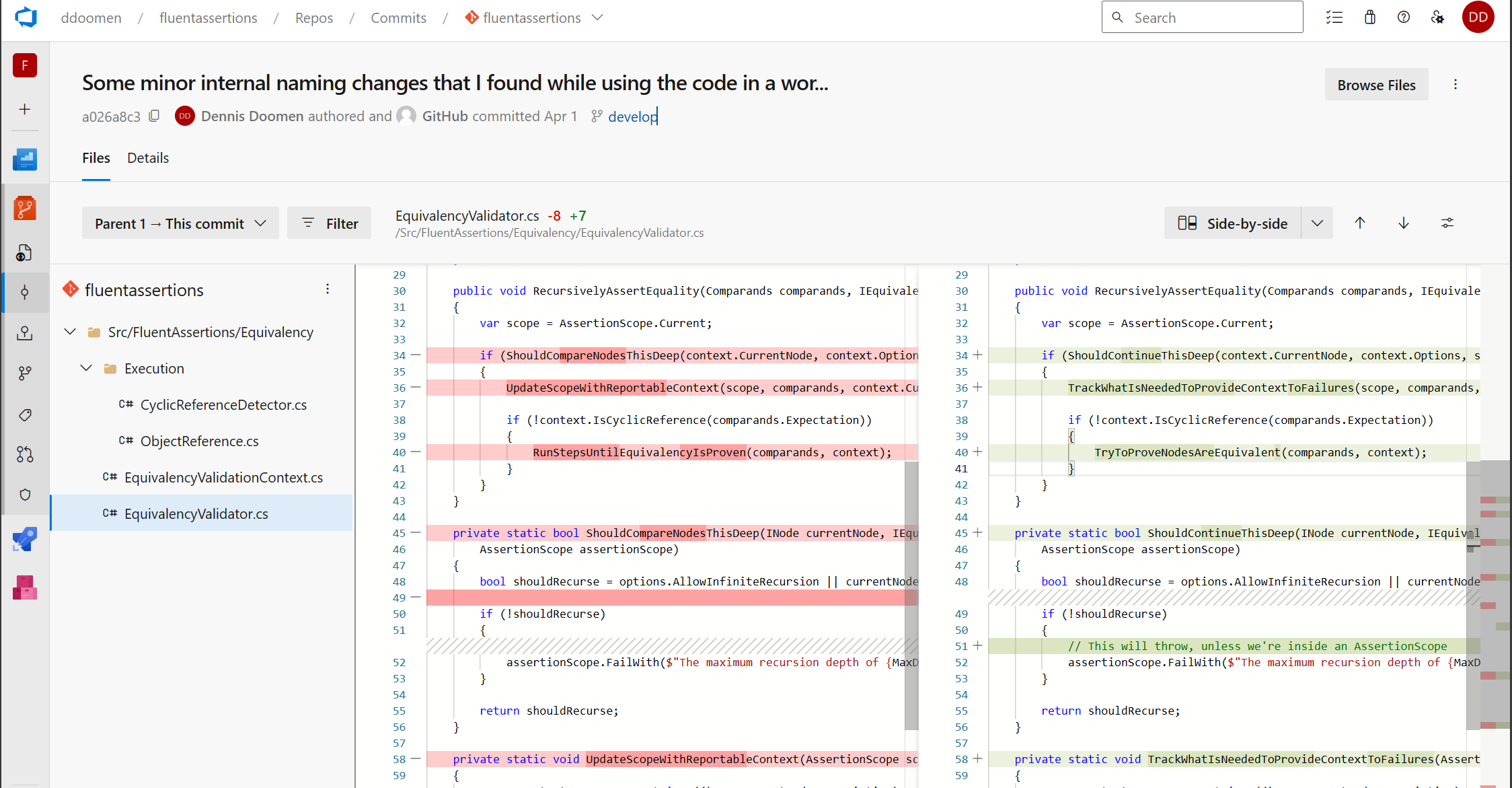
<p>The first thing I noticed when I had to review a pull request in AZDO is how little space is left for the actual file diff. The below view shows AZDO with as much parts of the UI collapsed as possible.</p>

<p><img src="https://www.dennisdoomen.com/assets/images/posts/2024/azdo-view.png" class="align-center" /></p>

<p>The toolbar on the left and the entire top header section remains visible (including the Side-by-Side button), even if you scroll down.</p>

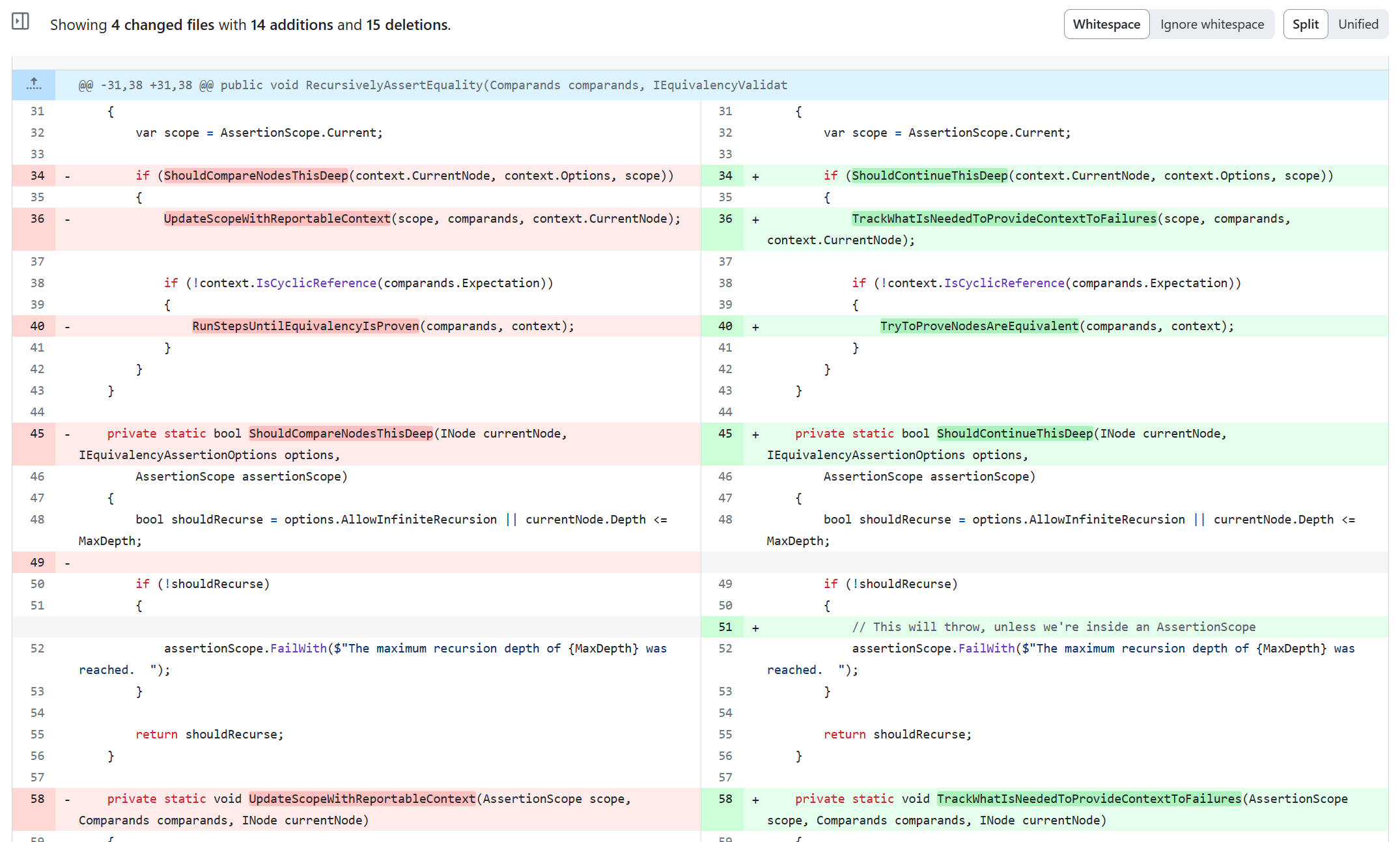
<p>Now compare this to the same file and same revision on GitHub. Notice that the entire top bar with your profile information and commit information is hidden so to keep as much screen real estate available for the diff. Also notice the readability of the changes lines compared to AZDO. For reference, both screenshots were made with the same browser and zooming set to 100%.</p>

<p><img src="https://www.dennisdoomen.com/assets/images/posts/2024/github-diff.png" class="align-center" /></p>

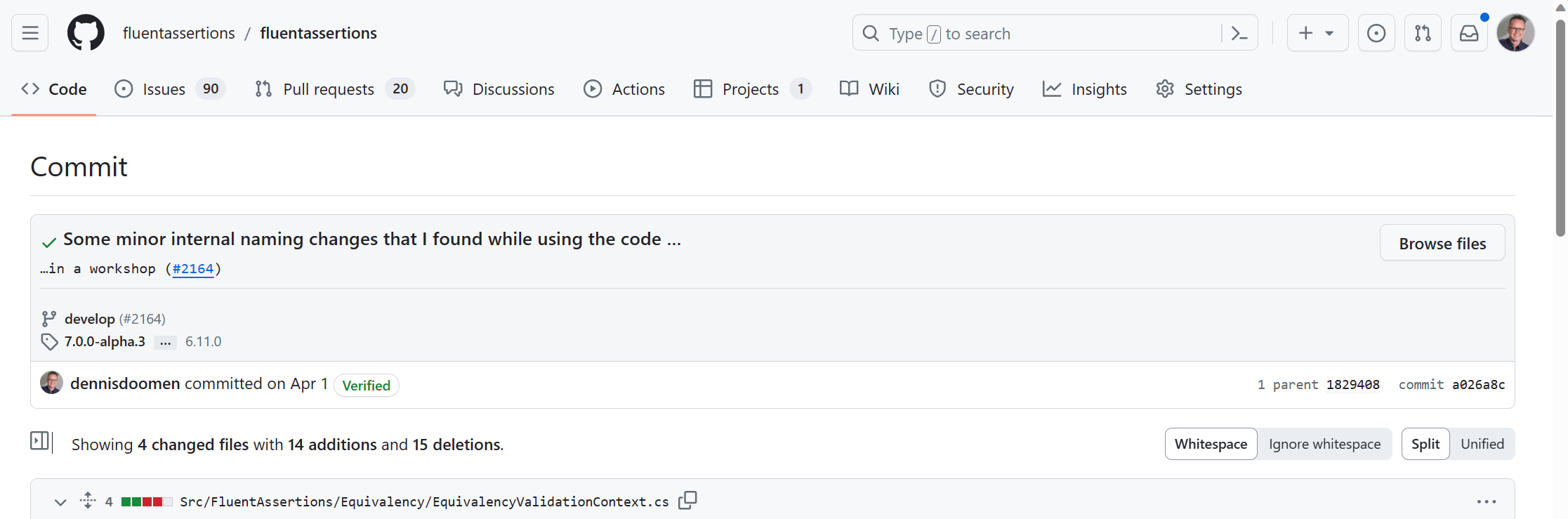
<p>Only when you scroll the view all the way to the top, then the rest of the information will reappear. GitHub is full with UX optimizations like that and keeps improving it.</p>

<p><img src="https://www.dennisdoomen.com/assets/images/posts/2024/github-diff2.png" class="align-center" /></p>

<h3 id="reviewing-commit-by-commit">Reviewing commit by commit</h3>
<p>While implementing a feature or fixing a bug, I almost always run into refactoring opportunities and potential naming improvements. To avoid polluting the functional changes with those refactorings, I try to separate those changes into separate commits. The idea is that it’ll make it easier for the reviewer to understand my changes, resulting in a quicker and more thorough review. Unfortunately, AZDO doesn’t properly support that. You <em>can</em> create a pull request with multiple commits, but the review comments on those commits will <em>not</em> be visible on the resulting pull request. In GitHub you can review one or more commits at the same time and easily browse back and forth between them.</p>

<p><img src="https://www.dennisdoomen.com/assets/images/posts/2024/github-commits.png" class="align-center" /></p>

<h3 id="stacking-branches">Stacking branches</h3>
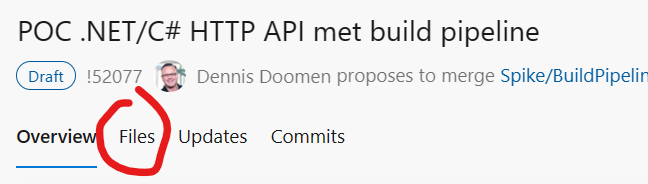
<p>As a single pull request with multiple commits doesn’t really work, I tried another approach where I push my changes to a branch, create a pull request, and then create a new branch from the previous one. By stacking those branches on top of each other, I can continue delivering my changes in a small chunks for easy reviewing and a clean history. But even that isn’t properly supported in AZDO. You <em>can</em> create a pull request from the branch that was stacked on top the previous one, but as soon as the original pull request is merged, AZDO gets confused. It’ll show the correct commits between the feature branch and the target branch of the pull request in the Commits tab, but the Files tab keeps showing files from the previous pull request this branch was based off. The only workaround is to recreate the pull request from scratch. But that is a pain if you tend to add an extensive rationale to every pull request.</p>

<p><img src="https://www.dennisdoomen.com/assets/images/posts/2024/azdo-files-tab.png" class="align-center" /></p>

<h3 id="grouping-code-review-comments">Grouping code-review comments</h3>
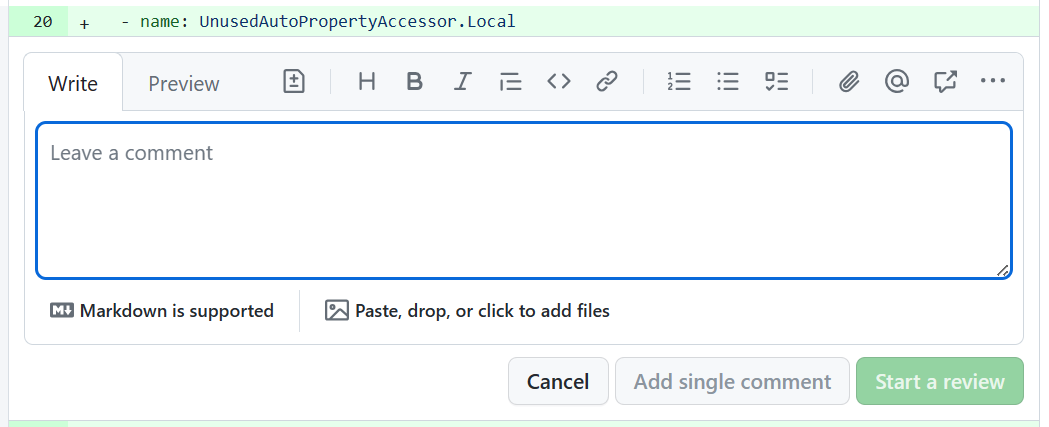
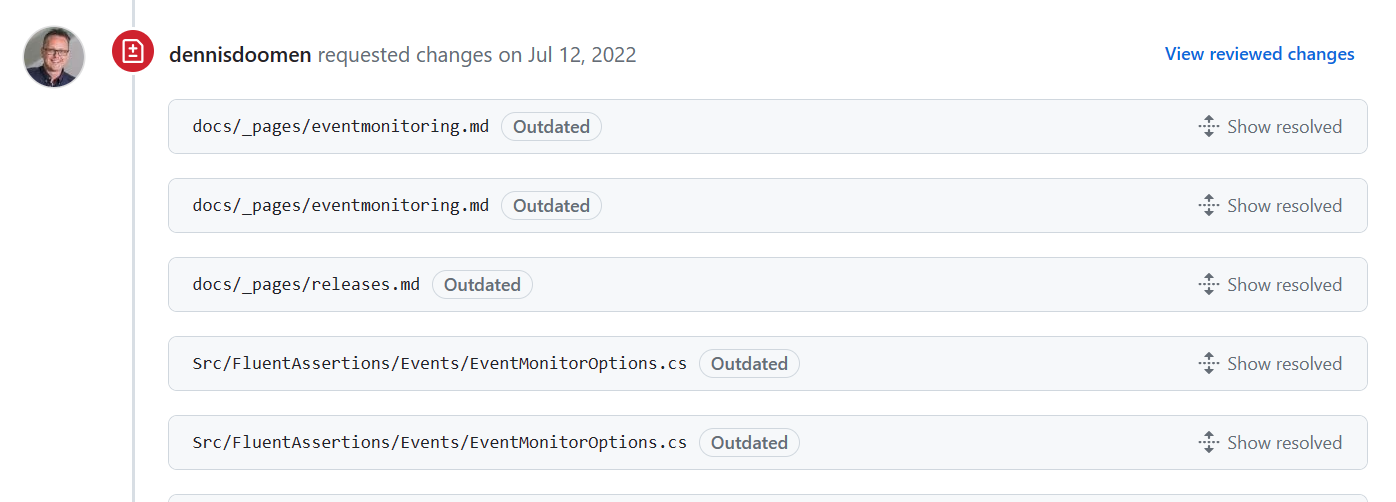
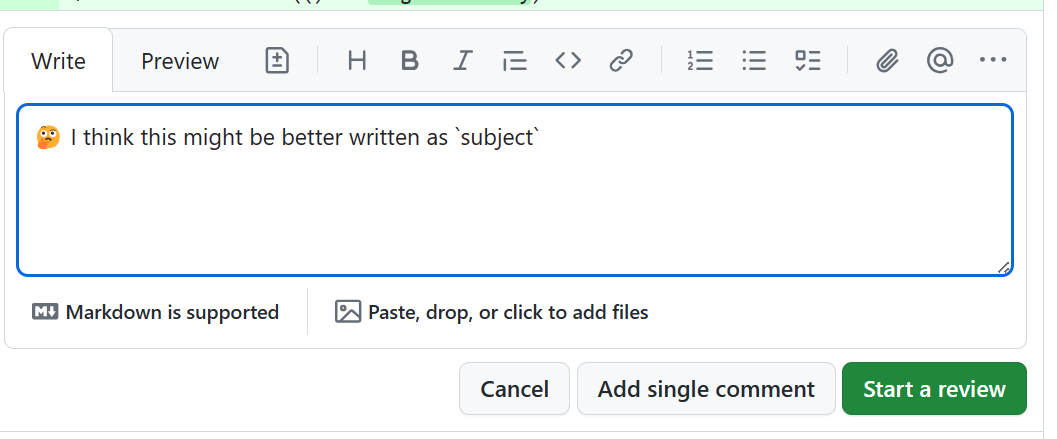
<p>A code review is a serious process that requires the reviewer to thoroughly understand the context of the changes and the changes themselves and provide well-written and thoughtfull comments. For example, I often use Emojis to emphasize my intention and help myself from bitpicking too much. GitHub allows you to submit individual comments, just like in AZDO, but it’s much more common to first complete the review and <em>then</em> submit them as one batch. Because of this, GitHub understands which comments belong together and will visually group them so to keep the comments from different reviewers organized.</p>

<p><img src="https://www.dennisdoomen.com/assets/images/posts/2024/github-comment-panel.png" class="align-center" /></p>

<p>A nice extra is that you can revise a previous comment before you submit the entire review. In fact, you can edit multiple comment at the same time.Sometimes I realize something while adding a code review comment and want to quickly update a previous comment before finalizing the current.</p>

<p><img src="https://www.dennisdoomen.com/assets/images/posts/2024/github-resolved-comments.png" class="align-center" /></p>

<h3 id="supporting-non-review-comments">Supporting non-review comments</h3>
<p>AZDO doesn’t allow me to make a distinction between review comments that need to be resolved or general comments on the pull request. So if I want to ping somebody so they are aware of the pull request or leave any other kind of comment like a link to a related pull request or issue, that comment will need to be “resolved” to unblock the pull request. In GitHub, you can make that decision per comment.</p>

<p><img src="https://www.dennisdoomen.com/assets/images/posts/2024/github-start-review.png" class="align-center" /></p>

<h3 id="tracking-force-pushes">Tracking force pushes</h3>
<p>As I often commit my changes into a temporary commit using <code class="language-plaintext highlighter-rouge">git save</code>, I also keep amending and force-pushing the follow-up changes to that same commit. I do the same when processing code review comments and pushing <a href="https://www.continuousimprover.com/2020/03/keep-source-control-history-clean.html">fix-up commits</a>. In AZDO, there’s no way to see what changes that force push overwrote. Compare this to GitHub, which adds a nice clickable link to see the differences.</p>

<p><img src="https://www.dennisdoomen.com/assets/images/posts/2024/github-force-push-diff.png" class="align-center" /></p>

<h3 id="expanding-the-diff-view">Expanding the diff view</h3>
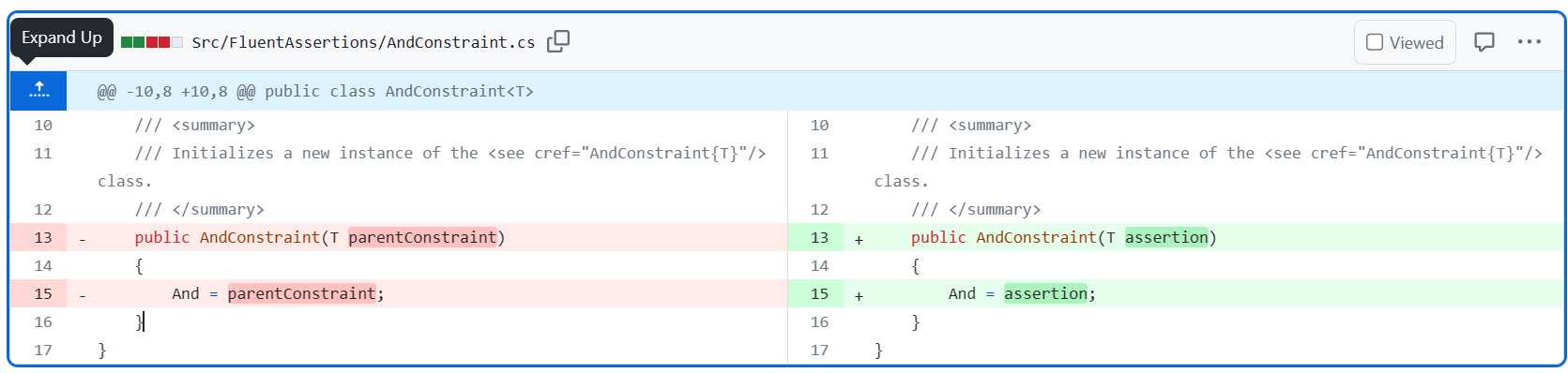
<p>Both AZDO and GitHub will hide the unchanged lines in the diff viewer. This is nice and makes it easier to review the relevant changes. But sometimes, you also want to see the context of the change. GitHub allows you to incrementally expand the diff to show the lines above or below.</p>

<p><img src="https://www.dennisdoomen.com/assets/images/posts/2024/github-expand-diff.png" class="align-center" /></p>

<h3 id="multi-line-links">Multi-line links</h3>
<p>In AZDO, creating a link to a specific line in a file that is part of a pull request is cumbersome. Also, there’s no way to create a link to multiple lines of text in such a PR. I often use that to refer to similar changes from a comment. In GitHub, you can SHIFT-click on a set of a lines to get a friendly URL you can share.</p>

<p><img src="https://www.dennisdoomen.com/assets/images/posts/2024/github-block-link.png" class="align-center" /></p>

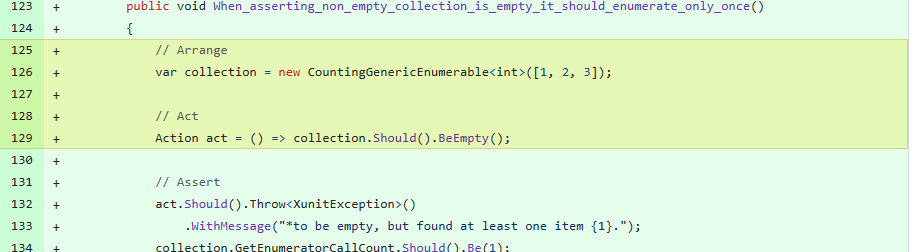
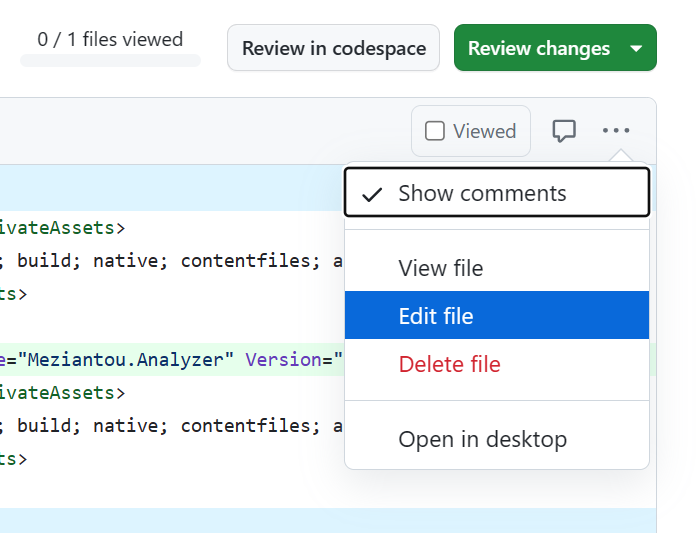
<h3 id="editing-files-during-review">Editing files during review</h3>
<p>In GitHub, you can directly edit a file that is a part of a pull request and which source branch might be even on a different fork. It’ll open a new window to edit the file and push a new commit directly to the source branch.</p>

<p><img src="https://www.dennisdoomen.com/assets/images/posts/2024/github-edit-file.png" class="align-center" /></p>

<p>And if you don’t have write access, GitHub will ask you whether you want to create a branch instead and use a pull request to the contributor’s fork.</p>

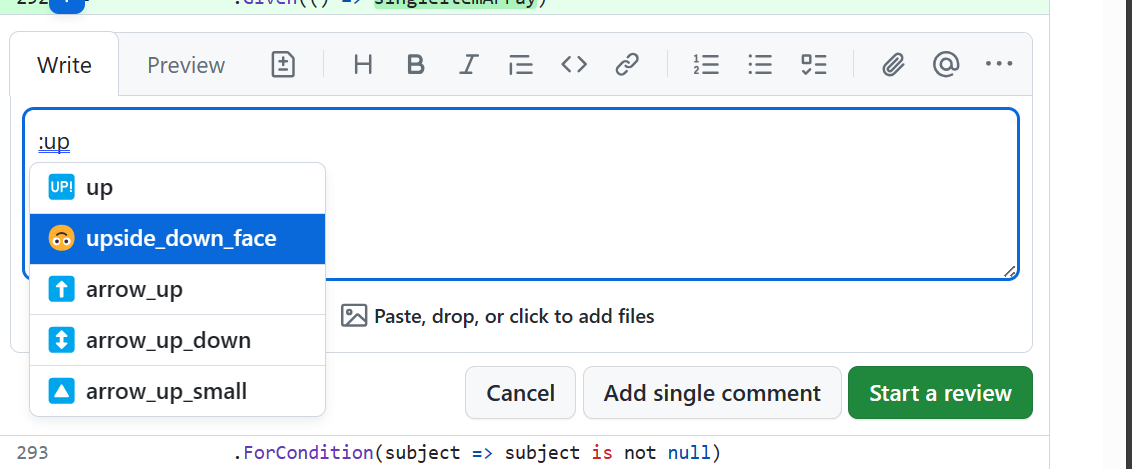
<h3 id="emoji-support">Emoji support</h3>
<p>As I use emojis a lot to help me categorize the code review comments (based on <a href="https://github.com/erikthedeveloper/code-review-emoji-guide">this article</a>), it’s slightly annoying that AZDO doesn’t auto-complete and understand emojis like <code class="language-plaintext highlighter-rouge">:wrench:</code>, <code class="language-plaintext highlighter-rouge">:question:</code>, `:seedling:. To be fair, on Windows, you can use the WIN-dot pop-up as a workaround.</p>

<p><img src="https://www.dennisdoomen.com/assets/images/posts/2024/github-emojis.png" class="align-center" /></p>

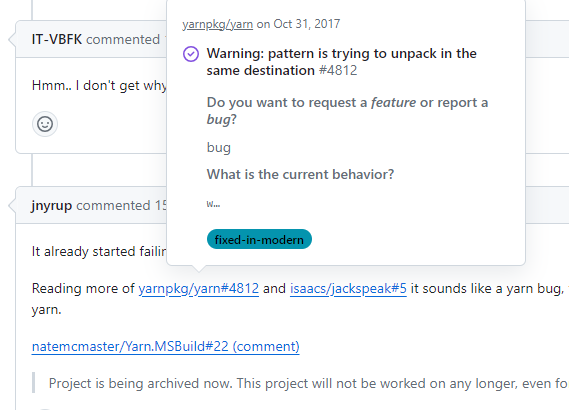
<h3 id="smart-linking">Smart linking</h3>
<p>If you paste a link to another pull request or issue into a pull request, AZDO will just do that: treat it as a link. GitHub is smart enough to realize that it is something native to GitHub and change it into a shortened version of that link that looks like any reference to something within GitHub. In fact, GitHub will also show you a summary of that issue or pull request in a pop-up if you hover your mouse over it.</p>

<p><img src="https://www.dennisdoomen.com/assets/images/posts/2024/github-hover.png" class="align-center" /></p>

<h2 id="other-features">Other features</h2>

<h3 id="symbol-navigation">Symbol navigation</h3>
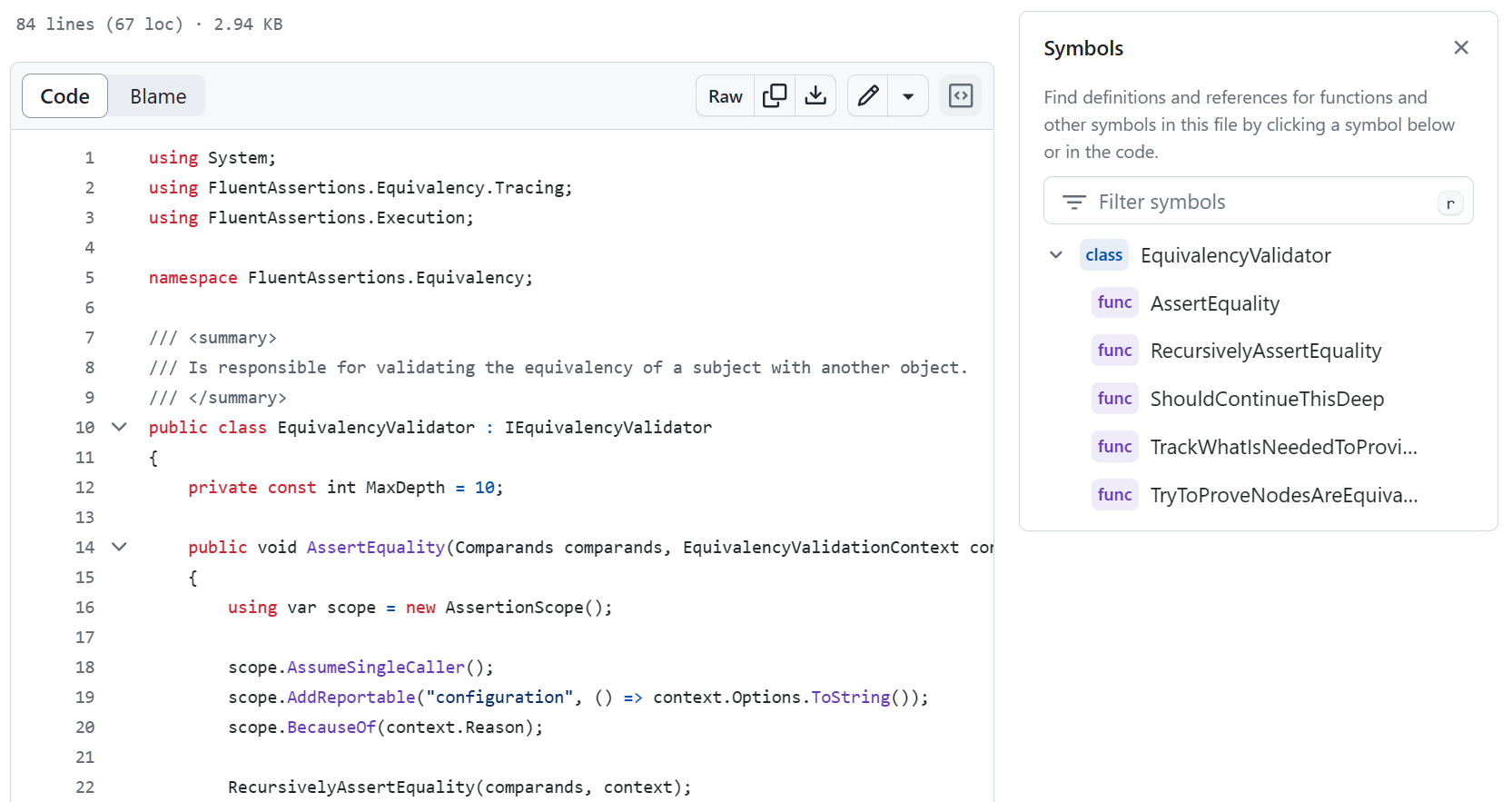
<p>As I said earlier, the GitHub C# parser has a deep understanding of the language. And because of that, it can provide a list of symbols within a class on a side panel.</p>

<p><img src="https://www.dennisdoomen.com/assets/images/posts/2024/github-symbols.png" class="align-center" /></p>

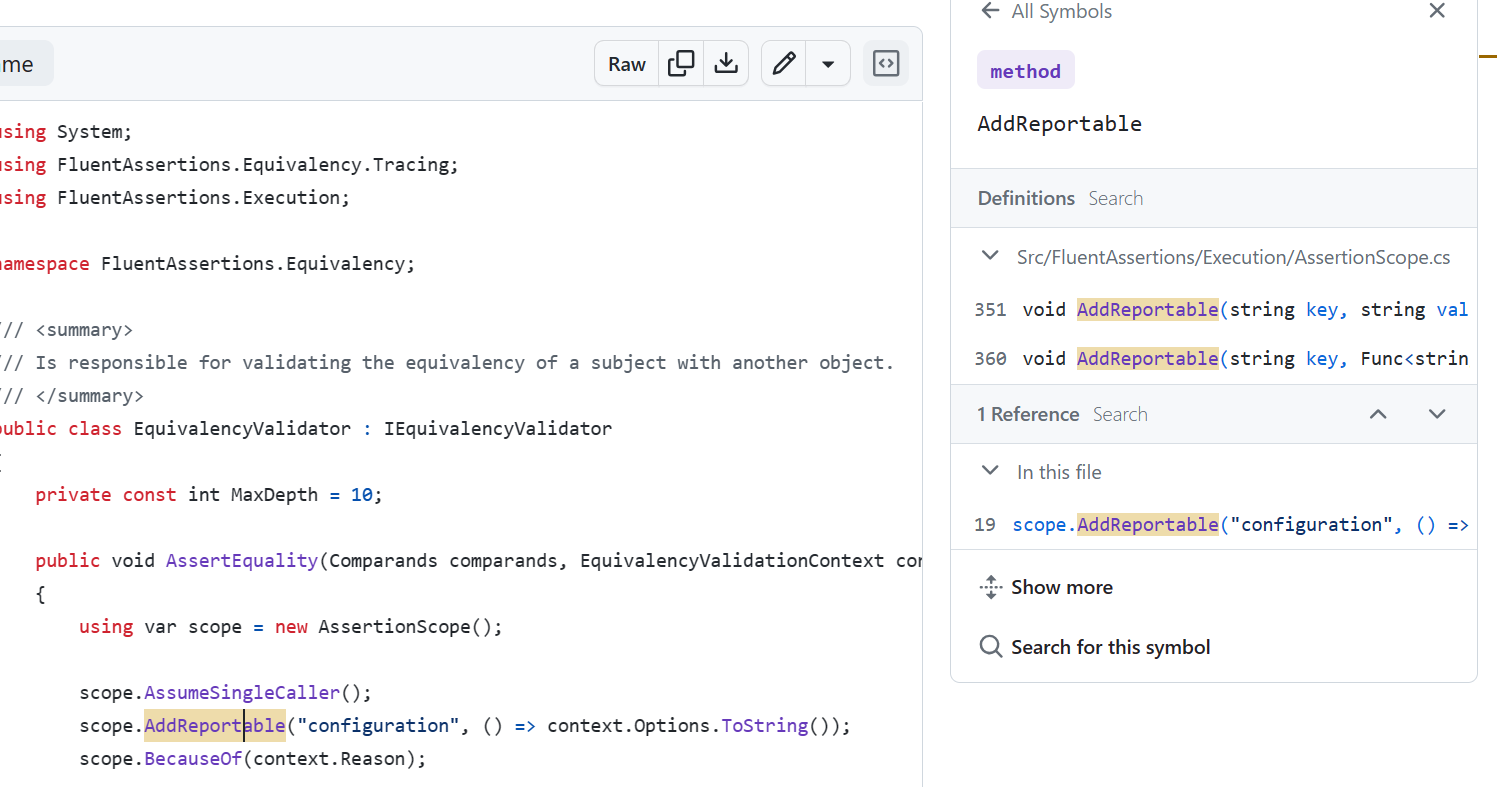
<p>But not only that, when you select a symbol such as the method below, it’ll immediatelly show you where that method is defined and where it is used. Not a critical feature, but it has helped me avoid the need to open up an IDE on many occasions.</p>

<p><img src="https://www.dennisdoomen.com/assets/images/posts/2024/github-references.png" class="align-center" /></p>

<p>And if you really need to power of a real IDE in your browser, just press the . (dot) key to open up the repository in <a href="https://code.visualstudio.com/docs/editor/vscode-web">Visual Studio Code for Web</a>.</p>

<h3 id="builds-vs-repositories">Builds vs repositories</h3>
<p>Although not a big issue, I do prefer the direct connection between a repository and its build pipelines. I do see the advantage of having a pipeline associated with multiple repositories as AZDO has it, but then make it visually clear how to find the pipeline for a repo. I now have to manually add a badge to the read-me.</p>

<p><img src="https://www.dennisdoomen.com/assets/images/posts/2024/azdo-badge.png" class="align-center" /></p>

<h3 id="auto-updating-dependencies">Auto-updating dependencies</h3>
<p>One of the biggest maintenance challenges most software projects have these days is to keep up with new versions of the open-source NPM and NuGet packages they depend on. I’ve seen my fair share of projects that neglected this and ran into breaking changes or hard to solve dependency conflicts at the most inconvenient time. And don’t get me started on vulnerabilities introduced by this. In GitHub, has something called <a href="https://github.com/features/security">Dependabot</a> that will automatically create pull requests that update your Nuget and NPM packages. It’s extremely smart, understands semantic versioning and is configurable enough to group updates to related packages.</p>

<p><img src="https://www.dennisdoomen.com/assets/images/posts/2024/github-dependabot.png" class="align-center" /></p>

<h3 id="push-and-create">Push and create</h3>
<p>While pushing a new branch from the CLI, GH will give you a link you can click to directly create a pull request on the website.</p>

<p><img src="https://www.dennisdoomen.com/assets/images/posts/2024/github-cli-pr.png" class="align-center" /></p>

<h3 id="the-github-cli">The GitHub CLI</h3>
<p>GitHub introduced a command-line tool called the <a href="https://cli.github.com/">GitHub CLI</a> that allows you to do practically everything you can through the website, think of things like creating forks, open issues, check out pull requests locally and many others.</p>

<p><img src="https://www.dennisdoomen.com/assets/images/posts/2024/github-cli.png" class="align-center" /></p>

<p>I use <code class="language-plaintext highlighter-rouge">gh</code> a lot to review pull requests locally, something which requires quite some git magic on AZDO.</p>

<p><img src="https://www.dennisdoomen.com/assets/images/posts/2024/github-cli-pr-checkout.png" class="align-center" /></p>

<h3 id="release-notes-generation">Release notes generation</h3>
<p>Another awesome GitHub feature that AZDO doesn’t have is the ability to generate release notes from pull requests. In Fluent Assertions, we use that heavily and will result in something like this</p>

<p><img src="https://www.dennisdoomen.com/assets/images/posts/2024/github-release-notes.png" class="align-center" /></p>

<p>Notice how it groups the pull requests, adds the links, avatars and names of the contributors and even mentions first-time contributors. And it’s all heavily customizable. Just check out <a href="https://github.com/fluentassertions/fluentassertions/blob/develop/.github/release.yml">the configuration</a> Fluent Assertions uses.</p>

<h3 id="repository-insights">Repository insights</h3>
<p>GitHub offers extensive insights in the activity of a repository, something unavailable in AZDO. Especially in larger organization with 100+ repositories, it’s a nice way to see which package is still maintained.</p>

<p><img src="https://www.dennisdoomen.com/assets/images/posts/2024/github-insights.png" class="align-center" /></p>

<h3 id="compare-anything">Compare anything</h3>
<p>In GitHub, you can compare any commit, branche or tags. In AZDO, you can only compare tags with tags or branches with branches. This can be quite annoying if you’re, for example, trying to figure out what changed between a feature branch and the last released tag. And the URL for comparing is quite human-readable. For example, <code class="language-plaintext highlighter-rouge">https://github.com/fluentassertions/fluentassertions/compare/6.12.0...develop</code> will give you something like this.</p>

<p><img src="https://www.dennisdoomen.com/assets/images/posts/2024/github-compare.png" class="align-center" /></p>

<h3 id="syntax-highlighting">Syntax highlighting</h3>
<p>Although AZDO does have some level of syntax highlighting for most file types, GitHub generally supports more file types and has better understanding of C# files. Compare for example the left screenshot from GitHub and a similar one from AZDO. Although the difference isn’t that big, you can see that the highlighter in GitHub really understands C#.</p>

<p><img src="https://www.dennisdoomen.com/assets/images/posts/2024/github-syntax.png" class="align-left" style="max-width: 400px" /> 
<img src="https://www.dennisdoomen.com/assets/images/posts/2024/azdo-syntax.png" class="align-right" style="max-width: 400px" /></p>

<h2 id="wrap-up">Wrap-up</h2>
<p>That was a bigger post than I initially thought it would take. Regardless, if you care about clean source control, quick and thorough reviews and intensive collaboration between teams, I urge you to drop Azure DevOps for source control and switch to GitHub. Even more if you care about up-to-date dependencies and reducing the risk of vulnerabilities. IMO, Dependabot is already reason enough to switch.</p>

<p>GitHub offers such a refined experience, it’s just not fair to other source control providers. It uses human-friendly URLs all over the place and its user interface is continuously being improved. In AZDO, it feels like the team is doing the minimum amount of work to support the most requested features and without considering proper interaction design. In GitHub, everything feels so well-thought-out.</p>

<p>If you’re considering to drop AZDO altogether, know that work item tracking is not yet on par with AZDO. Although looking at the pace at which new issue tracking features are added, I’m sure it’s getting there pretty fast. And if you can’t wait for that and want to completely drop AZDO, switch to JIRA. I have nothing but great experiences with JIRA.</p>

<p>It hurts to work with AZDO. Not because of personal feelings, but because I’ve seen myself how it is holding back the teams I work with to collaborate efficiently and commit code that has a high level of traceability.</p>

<p>So if you see the chance to try GitHub, do it. You’ll never look back.</p>

<h2 id="about-me">About me</h2>
<p>I’m a Microsoft MVP and Principal Consultant at <a href="https://avivasolutions.nl/">Aviva Solutions</a> with 27 years of experience under my belt. As a coding software architect and/or lead developer, I specialize in building or improving (legacy) full-stack enterprise solutions based on .NET as well as providing coaching on all aspects of designing, building, deploying and maintaining software systems. I’m the author of <a href="https://www.fluentassertions.com">Fluent Assertions</a>, a popular .NET assertion library, <a href="https://www.liquidprojections.net">Liquid Projections</a>, a set of libraries for building Event Sourcing projections and I’ve been maintaining <a href="https://www.csharpcodingguidelines.com">coding guidelines for C#</a> since 2001. You can find me on <a href="https://twitter.com/ddoomen">Twitter</a>, <a href="https://mastodon.social/@ddoomen">Mastadon</a> and <a href="https://bsky.app/profile/ddoomen.bsky.social">Blue Sky</a>.</p>]]></content><author><name>Dennis Doomen</name><email>dennis.doomen@avivasolutions.nl</email></author><category term="collaboration" /><category term="tooling" /><category term="git" /><category term="github" /><category term="source control" /><category term="inner sourcing" /><summary type="html"><![CDATA[How Azure DevOps is holding back the teams I work with to collaborate efficiently and commit code that has a high level of traceability, and how GitHub fixes that]]></summary></entry><entry><title type="html">Confluence, a wiki that will make people collaborate on documentation</title><link href="https://www.dennisdoomen.com/2023/07/confluence-wiki.html" rel="alternate" type="text/html" title="Confluence, a wiki that will make people collaborate on documentation" /><published>2023-07-02T00:00:00+00:00</published><updated>2023-07-02T00:00:00+00:00</updated><id>https://www.dennisdoomen.com/2023/07/confluence-wiki</id><content type="html" xml:base="https://www.dennisdoomen.com/2023/07/confluence-wiki.html"><![CDATA[<h2 id="why-do-you-care">Why do you care?</h2>

<p>A very common discussion within organizations that do software development is what tool to use for documentation. Developers are usually pretty opinionated about that, if only because they want to ensure nothing gets in the way of doing the thing they love most: coding. Other people just want to be able to write down their notes <em>and</em> being able to find them back. Although I love coding, I also really care about being able to track my notes and my breakdowns, but more importantly, to capture architectural decisions, development guidelines, and share technical information through internal blogs.</p>

<p>But this seems to be a hard problem to solve. For example, do you recognize some of the below symptoms?</p>

<ul>
  <li>Documents can be found in Microsoft Word, PowerPoint, <a href="https://miro.com/">Miro</a>, <a href="https://support.microsoft.com/en-us/office/create-and-edit-a-wiki-dc64f9c2-d1a2-44b5-ac59-b9d535551a32">SharePoint wikis</a> and <a href="https://learn.microsoft.com/en-us/azure/devops/project/wiki/wiki-create-repo?view=azure-devops&amp;tabs=browser">Azure DevOps wikis</a></li>
  <li>People use PowerPoint to capture notes during meetings.</li>
  <li>You’ll find Word and PowerPoint documents all over the place, including OneDrive, folders within Microsoft Teams, local machines and SharePoint.</li>
  <li>Unless somebody remembers where a document is, there’s no central place to find stuff.</li>
  <li>People are sending around copies of those documents over e-mail.</li>
  <li>Miro is used for structural documentation, because it’s the most versatile tool they have.</li>
  <li>Everybody is continuously asking themselves were to put their meeting notes, brainstorm content and decisions.</li>
  <li>Developers love to use Markdown, some proprietary markup or Mermaid to write content and create diagrams, whereas non-developers just want to see what they are doing.</li>
</ul>

<p>For me, having a documentation platform that promotes collaboration is a crucial element of successful software architecture. Here are some of my main requirements.</p>

<ul>
  <li>Being able to capture decisions, general documentation, technical breakdowns, temporary notes, all without being forced to use some kind of template.</li>
  <li>Easy to use for people that prefer WYSIWYG editing (like me), but powerful enough for those that prefer to use Markdown syntax here and there (like me).</li>
  <li>The ability to publish internal blog posts to keep each other apprised of important technical and non-technical opportunities, or just to share your favorite tips and tricks.</li>
  <li>The ability to create diagrams without leaving the confines of the documentation platform.</li>
  <li>It would be great to be able to create some kind of time line or roadmap to visualize proposed plans</li>
  <li>Searching across all content should be a great experience with auto-completion that takes into account recent changes.</li>
  <li>To keep any RSI problems from reappearing, keyboard support is crucial for me. I prefer to use the mouse as little as possible.</li>
</ul>

<h2 id="features-drill-down">Features drill-down</h2>
<p>So given those requirements, I’ve been comparing SharePoint, Azure DevOps wikis (which are mostly the same as Github wikis) and <a href="https://www.atlassian.com/software/confluence/features">Atlassian Confluence</a>.</p>

<h3 id="editing">Editing</h3>
<p>Each product takes a different approach. SharePoint is a portal product, so editing is always <em>What You See Is What You Get</em> (WYSIWYG). Azure DevOps (AZDO) and GitHub wikis are pure <a href="https://www.markdownguide.org/">Markdown editors</a>. Confluence is primarily a WYSIWYG editor, supports some parts of Markdown but provides almost every other option it supports using the <code class="language-plaintext highlighter-rouge">\</code> key. All products have some kind of versioning, but Confluence is the only one that allows you to compare multiple revisions in one go.</p>

<p>Another big difference is how you start with a new page. SharePoint does support some kind of wiki feature, but that’s a legacy feature that hasn’t seen any development in over a decade. But everything else is always based on a strict template that is quite noisy and leaves little room for the actual content. Confluence always starts out with an empty page, but offers you about 130 templates that you can apply. Also, you can take any page and turn it into a template.</p>

<p>A nice feature that I value a lot myself is the personal space that Confluence offers. I often start creating some notes there without thinking too much about structure. Sometimes I leave it like that, but more often than not, I move that personal page into one of the existing spaces when it reaches some kind of quality level. There are no limits on how you can move pages around or reshuffle them in hierarchies. This also highlights another difference with the other products. In Confluence, everything is open for everyone, unless you choose otherwise. Most organizations that use SharePoint and Azure DevOps tend to lock everything down, which doesn’t help collaboration.</p>

<p>In Confluence, every space has an optional internal blog. This is mostly a special way to organize pages by year and month and any page can be converted to a blog post. AZDO doesn’t have anything like that, but SharePoint has news posts, something that looks a little bit like that. Blog posts are a great way to share information with your colleagues without the need to keep them up-to-date.</p>

<p>In terms of working with images, there aren’t many differences. Both SharePoint and Confluence are very flexible. And you can paste images into AZDO, but changing its size, location and such requires Markdown syntax (or some custom CSS styling). Both SharePoint as well as Confluence support header images. A nice extra gimmick of Confluence is the status icon.</p>

<p><img src="https://www.dennisdoomen.com/assets/images/posts/2023/confluence1.png" class="align-center" /></p>

<p>But in addition to the refined editing experience, Confluence offers two additional USPs. One is the ability to have two or more people edit the same page at the same time, just like you can with Office documents stored on SharePoint or OneDrive. This is a crucial feature to make collaboration during meetings possible.</p>

<p>The other USP is the mobile app. You might wonder why you want to edit on a mobile app. But as a developer, I often come up with ideas or insights during breaks, workouts or while away. Being able to quickly add some notes through the mobile app really helped the creative process software development really is.</p>

<h3 id="collaboration">Collaboration</h3>
<p>There’s no point in producing a page of documentation without making it easy for other colleagues to review and contribute. All products in this comparison support page-level comments, but only Confluence allows you to leave a comment on a specific line (or part of it) and have a follow-up discussion. Also, unlike Azure DevOps, both SharePoint and Confluence allow you to like a page, but Confluence allows you to use emojis as well. Tagging somebody in a page using e.g. <code class="language-plaintext highlighter-rouge">@dennisdoomen</code> only works on AZDO and Confluence.</p>

<p>When somebody modifies a page you created or touched, Confluence will automatically make you a <em>follower</em> and send you notifications. You can choose whether you want to get those notifications directly, at the end of the end, or once a week. I think you do the same in SharePoint, but I couldn’t find any similar options in AZDO. In fact, unless you explicitly follow a page, you will not get notifications whatsoever (which is a shame). All products are sophisticated enough to allow you to take a link to a paragraph header, but only Confluence will copy that link to the clipboard just by clicking an icon next to the header.</p>

<p>Unique Confluence features that I use every day are the ability to create actions, right in a page and assign those to people. Don’t get me wrong. They are not meant to replace a proper work item tracking solution. I typically use them to identify follow-up questions or things to complete a particular page. Those tasks will show up next to your profile information, but you can also create a page to list all tasks for a particular space or group of pages. Similarly, when collecting notes in meetings, I often use the decision macro to track important agreements. But you can easily use another macro to generate a list of those decisions on another page.</p>

<p><img src="https://www.dennisdoomen.com/assets/images/posts/2023/confluence2.png" class="align-center" /></p>

<h3 id="tables">Tables</h3>
<p>As an architect, I use tables a lot. They help me structure my thoughts in a presentable way and are a perfect technique to compare multiple options when trying to determine the pros and cons. All three products in this evaluation support creating tables, but the difference is big.</p>

<p>The least powerful is Azure DevOps, which relies on Markdown and the corresponding <a href="https://www.markdownguide.org/extended-syntax/#tables">cryptic method</a> of using pipes to model columns and rows. Yes, there’s a button to quickly create an initial table and you can align columns left and right if you know the syntax, but that’s it. No colors. No merging of columns, no sorting.</p>

<p>SharePoint has a more WYSIWYG experience and provides two options for creating tables. One is based on a primary concept in SharePoint called lists, but which is less suitable for wiki pages. The other one is part of the news/wiki functionality and allow you to create tables the way you expect to. It provides various options to align columns, add or remove rows, add images in cells and a couple of predefined coloring options.</p>

<p>However, none of that is comparable to Confluence where you create a new table using the toolbar or using the <code class="language-plaintext highlighter-rouge">/table</code> command (which auto-completes). But it’s the UI experience that really shines in the way you can order, sort, assign colors to columns, cells and rows and where most actions require only a single click. You can even specify how that table should fill the horizontal space of that page. So it’s totally fine to have the table span the entire page, even if the page itself is using the default width optimized for reading. Oh, and it’s only product that support merging cells.</p>

<p>But just as with everything else in Confluence, it’s the little things that make it such a great product. If your table is big and doesn’t entirely fit on the screen, it will provide proper scrolling capabilities <em>and</em> keep the header column and rows always visible.</p>

<p><img src="https://www.dennisdoomen.com/assets/images/posts/2023/confluence3.png" class="align-center" /></p>

<p>But that’s not all. You can also dynamically build tables from data on other pages. I use that a lot to build a decision log from a set of pages representing architectural design decisions. And what do you think of being able to visualize table data in graphs, just like you can in Excel?</p>

<h3 id="visual-content">Visual content</h3>
<p>In addition to creating graphs, there’s a a lot more want to present on a page. Azure DevOps has the least amount of options, although it’s the only one that supports Mermaid syntax and formulas without the need to install something from a Marketplace. Both Confluence and SharePoint support tons of options for displaying embedded Excel sheets, PowerPoint presentations, images, videos and such. Confluence adds to this embedded diagrams using <a href="https://www.drawio.com/blog/embed-diagrams-confluence-server">DrawIO</a>, something I use to add <a href="https://c4model.com/">C4</a> and UML diagrams to technical documentation, and visual roadmaps. Both Azure DevOps and Confluence support generating a table of contents, but Confluence has a huge marketplace with free and paid plug-ins to visualize other kind of content.</p>

<p><img src="https://www.dennisdoomen.com/assets/images/posts/2023/confluence4.png" class="align-center" /></p>

<h3 id="searching-and-navigation">Searching and navigation</h3>
<p>All products provide reasonably decent search capabilities and all will try to load results as soon as you start typing. Although SharePoint only includes pages in the list of results when you start typing, it can search in Office documents. They won’t show up until you ask it for more results though. Azure DevOps seems to have the most flaky behavior. Sometimes it doesn’t show any results until you press ENTER, sometimes it just lists the number of items it found, and sometimes you get a list of prefixes you can use. It might be me, but I’m missing the logic behind that. It’s also the only one that does <em>not</em> show recent searches. Confluence is the only one that allows searching for pages based on a label or tag, and also is the only one that supports searching using partial keywords. So, unlike the other products, you <em>can</em> find my content by searching for “enni”. And one neat feature that both Confluence as well as SharePoint have are related pages. In Confluence, it even provides cues on how it determined that those are related.</p>

<p><img src="https://www.dennisdoomen.com/assets/images/posts/2023/confluence5.png" class="align-center" /></p>

<h3 id="usability">Usability</h3>
<p>From a usability standpoint there’s not much in Azure DevOps and SharePoint that is worth mentioning. This is clearly not a priority for Microsoft. And that’s the complete opposite for Confluence. From my experience, Atlassian really tries to understand how people are using the product and keeps making the writing and collaboration experience better.</p>

<p>Practically every macro or construct is available using the <code class="language-plaintext highlighter-rouge">/</code> key and the options to enrich that original blank page are numerous. It also understands that long lines don’t help with readability and optimizes the page width for that (which you can always override if you need to). And you never have to be afraid that you loose your changes when your internet connection goes down, your browser crashes or you accidentally closed a tab. Confluence will keep your (draft) notes around, both on-line and off-line. And did I mention the ability edit the same page at the same time, just like you can in Office? This works beautifully during meetings because you can see each other’s cursor and can work on the content at the same time, even with multiple people.</p>

<h3 id="other-features">Other features</h3>
<p>Moving content in and out of the three products works quite differently. SharePoint is a portal product and is closely integrated with Office 365, so it’s designed for displaying all kinds of content. Azure DevOps doesn’t do any kind of integration, but Confluence allows you to upload Office files and edit them using a companion app you need to install locally. It’s workable, but not comparable to the SharePoint or OneDrive editing experience. On the other hand, unlike Confluence, pasting links in Azure DevOps or SharePoint doesn’t do more than creating clickable phrases of text. Compare that to how Confluence renders links:</p>

<p><img src="https://www.dennisdoomen.com/assets/images/posts/2023/confluence6.png" class="align-center" /></p>

<p>And pasting links to JIRA, GitHub or AZDO issues provides a similar experiences. When you do, it’ll ask you to authenticate with the corresponding service (if needed) and then render them in a similar fashion.</p>

<p><img src="https://www.dennisdoomen.com/assets/images/posts/2023/confluence7.png" class="align-center" /></p>

<p>Every product supports exporting a page to PDF using the PDF printer that comes with Windows (which, I assume, works the same on other platforms). Confluence adds native support for exporting to Word or PDF to that. However, if  you heavily rely on wide-screen tables and emojis, it doesn’t look that great unfortunately.</p>

<p>Copy and pasting between products is always a painful topic, especially if you’re moving from one to the other. When you copy something to SharePoint, you’ll often spend quite some time trying to get the formatting right. Using Windows’ copy-as-text can help here. Copying anything to Azure DevOps wikis basically means copying some text and then manually adding all the Markdown to repair the links, fix the tables and such. Again, Confluence is a different beast. It’s smart enough to convert headings to the correct heading type, and since Confluence only uses a single font type and size, you will never have to fiddle around with formatting issues. I particularly liked how you can copy a page from an Azure DevOps wiki to Confluence and keep all the headings, images and such.</p>

<h3 id="a-detailed-comparison">A detailed comparison</h3>
<p>This completes the deep-dive and comparison of the three products. But before getting to the conclusion, here’s a table listing some of the important differences.</p>

<table>
  <thead>
    <tr>
      <th> </th>
      <th>SharePoint</th>
      <th>Azure DevOps Wikis</th>
      <th>Confluence</th>
    </tr>
  </thead>
  <tbody>
    <tr>
      <td>Version control</td>
      <td>✅</td>
      <td>✅</td>
      <td>✅</td>
    </tr>
    <tr>
      <td>Keyboard shortcuts</td>
      <td>❌</td>
      <td>✅</td>
      <td>✅</td>
    </tr>
    <tr>
      <td>WYSIWYG editing</td>
      <td>✅</td>
      <td>❌</td>
      <td>✅</td>
    </tr>
    <tr>
      <td>Markdown support</td>
      <td>❌</td>
      <td>✅</td>
      <td>✅</td>
    </tr>
    <tr>
      <td>Integrated diagrams</td>
      <td>❌</td>
      <td>✅ (through Mermaid)</td>
      <td>✅ (Draw.io)</td>
    </tr>
    <tr>
      <td>Blog</td>
      <td>✅</td>
      <td>✅</td>
      <td>✅</td>
    </tr>
    <tr>
      <td>Personal pages</td>
      <td>❌</td>
      <td>❌</td>
      <td>✅</td>
    </tr>
    <tr>
      <td>Searching</td>
      <td> </td>
      <td> </td>
      <td> </td>
    </tr>
    <tr>
      <td>- Live completion</td>
      <td>✅</td>
      <td>✅</td>
      <td>✅</td>
    </tr>
    <tr>
      <td>- Recent searches</td>
      <td>✅</td>
      <td>❌</td>
      <td>✅</td>
    </tr>
    <tr>
      <td>- Partial keywords</td>
      <td>❌</td>
      <td>❌</td>
      <td>✅</td>
    </tr>
    <tr>
      <td>- By label/tags</td>
      <td>❌</td>
      <td>❌</td>
      <td>✅</td>
    </tr>
    <tr>
      <td>Tables</td>
      <td> </td>
      <td> </td>
      <td> </td>
    </tr>
    <tr>
      <td>- Create/modify</td>
      <td>WYSIWYG</td>
      <td>Markdown</td>
      <td>WYSIWYG</td>
    </tr>
    <tr>
      <td>- Sorting</td>
      <td>✅</td>
      <td>❌</td>
      <td>✅</td>
    </tr>
    <tr>
      <td>- Colors</td>
      <td>❌</td>
      <td>❌</td>
      <td>✅</td>
    </tr>
    <tr>
      <td>- Column merging</td>
      <td>❌</td>
      <td>❌</td>
      <td>✅</td>
    </tr>
    <tr>
      <td>- Keep headers visible while scrolling</td>
      <td>❌</td>
      <td>❌</td>
      <td>✅</td>
    </tr>
    <tr>
      <td>Collaboration</td>
      <td> </td>
      <td> </td>
      <td> </td>
    </tr>
    <tr>
      <td>- In-line comments</td>
      <td>❌</td>
      <td>❌</td>
      <td>✅</td>
    </tr>
    <tr>
      <td>- Page-level comments</td>
      <td>✅</td>
      <td>✅</td>
      <td>✅</td>
    </tr>
    <tr>
      <td>- Like pages</td>
      <td>✅</td>
      <td>❌</td>
      <td>✅</td>
    </tr>
    <tr>
      <td>- Emojis</td>
      <td>✅</td>
      <td>✅</td>
      <td>✅</td>
    </tr>
    <tr>
      <td>- Tagging people</td>
      <td>❌</td>
      <td>✅</td>
      <td>✅</td>
    </tr>
    <tr>
      <td>- Assign actions</td>
      <td>❌</td>
      <td>❌</td>
      <td>✅</td>
    </tr>
    <tr>
      <td>- Live editing</td>
      <td>❌</td>
      <td>❌</td>
      <td>✅</td>
    </tr>
    <tr>
      <td>Import/export content</td>
      <td> </td>
      <td> </td>
      <td> </td>
    </tr>
    <tr>
      <td>- Images</td>
      <td>✅</td>
      <td>✅</td>
      <td>✅</td>
    </tr>
    <tr>
      <td>- other content</td>
      <td>✅</td>
      <td>❌</td>
      <td>✅</td>
    </tr>
    <tr>
      <td>Access management</td>
      <td> </td>
      <td> </td>
      <td> </td>
    </tr>
    <tr>
      <td>- Default</td>
      <td>Closed</td>
      <td>Open</td>
      <td>Open</td>
    </tr>
    <tr>
      <td>- Page-level permissions</td>
      <td>❌</td>
      <td>❌</td>
      <td>✅</td>
    </tr>
    <tr>
      <td>Notifications</td>
      <td>✅</td>
      <td>✅</td>
      <td>✅</td>
    </tr>
    <tr>
      <td>Follow entire wiki</td>
      <td>❌</td>
      <td>❌</td>
      <td>✅</td>
    </tr>
    <tr>
      <td>Android / iOS app</td>
      <td>❌</td>
      <td>❌</td>
      <td>✅</td>
    </tr>
    <tr>
      <td>Auto-saving (i.e. crashes)</td>
      <td>❌</td>
      <td>❌</td>
      <td>✅</td>
    </tr>
    <tr>
      <td>Templates</td>
      <td>✅ (forced)</td>
      <td>❌</td>
      <td>✅ (opt-in)</td>
    </tr>
    <tr>
      <td>Integration with AZDO/JIRA/Github</td>
      <td>❌</td>
      <td>✅</td>
      <td>✅</td>
    </tr>
    <tr>
      <td>Roadmapping</td>
      <td>❌</td>
      <td>❌</td>
      <td>✅</td>
    </tr>
    <tr>
      <td>Clickable headers</td>
      <td>❌</td>
      <td>✅</td>
      <td>✅</td>
    </tr>
    <tr>
      <td>Reorganize pages</td>
      <td>✅ (only within site)</td>
      <td>✅ (only within project)</td>
      <td>✅ (everywhere)</td>
    </tr>
    <tr>
      <td>Edit Office documents</td>
      <td>✅</td>
      <td>✅</td>
      <td>✅</td>
    </tr>
    <tr>
      <td>Automatic lists (e.g. a decision log)</td>
      <td>✅ (using SharePoint Lists)</td>
      <td>❌</td>
      <td>✅</td>
    </tr>
    <tr>
      <td>Wide-screen support</td>
      <td>❌</td>
      <td>❌</td>
      <td>✅</td>
    </tr>
    <tr>
      <td>Immersive reading</td>
      <td>✅</td>
      <td>❌</td>
      <td>✅</td>
    </tr>
    <tr>
      <td>Single Sign-on</td>
      <td>✅</td>
      <td>✅</td>
      <td>✅</td>
    </tr>
  </tbody>
</table>

<h3 id="in-conclusion">In conclusion</h3>
<p>Even though a lot of people think these products are alike, I’ve essentially been comparing apples and oranges. SharePoint is a portal product which is designed to build visually appealing intranets, share news and provide lists of Office documents. Azure DevOps offers a non-WYSIWYG wiki, which in terms of functionality is nothing more than that: a wiki like we know from the past. The only real documentation and collaboration platform in this comparison is Confluence. I’m a big fan of many of the Microsoft products, but if you are talking about the best of breed, then Atlassian is miles ahead of the other products. In fact, it’s not even a real comparison. Confluence offers such a refined experience, that I’ve seen first-hand how people stop using email and Office documents altogether.</p>

<h2 id="about-me">About me</h2>
<p>I’m a Microsoft MVP and Principal Consultant at <a href="https://avivasolutions.nl/">Aviva Solutions</a> with 26 years of experience under my belt. As a coding software architect and/or lead developer, I specialize in building or improving (legacy) full-stack enterprise solutions based on .NET as well as providing coaching on all aspects of designing, building, deploying and maintaining software systems. I’m the author of <a href="https://www.fluentassertions.com">Fluent Assertions</a>, a popular .NET assertion library, <a href="https://www.liquidprojections.net">Liquid Projections</a>, a set of libraries for building Event Sourcing projections and I’ve been maintaining <a href="https://www.csharpcodingguidelines.com">coding guidelines for C#</a> since 2001. You can find me on <a href="https://twitter.com/ddoomen">Twitter</a>, <a href="https://mastodon.social/@ddoomen">Mastadon</a> and <a href="https://bsky.app/profile/ddoomen.bsky.social">Blue Sky</a>.</p>]]></content><author><name>Dennis Doomen</name><email>dennis.doomen@avivasolutions.nl</email></author><category term="collaboration" /><category term="documentation" /><category term="tooling" /><category term="team work" /><category term="confluence" /><category term="azure-devops" /><category term="sharepoint" /><summary type="html"><![CDATA[An in-depth evaluation of SharePoint, Azure DevOps Wikis and Atlassian Confluence as a documentation and collaboration platform]]></summary></entry><entry><title type="html">Monetizing open-source development and supporting the community</title><link href="https://www.dennisdoomen.com/2023/06/funding-open-source.html" rel="alternate" type="text/html" title="Monetizing open-source development and supporting the community" /><published>2023-06-23T00:00:00+00:00</published><updated>2023-06-23T00:00:00+00:00</updated><id>https://www.dennisdoomen.com/2023/06/funding-open-source</id><content type="html" xml:base="https://www.dennisdoomen.com/2023/06/funding-open-source.html"><![CDATA[<p>I was recently interviewed by a popular .NET podcast and we ended up discussing how to get companies to support the open-source community. So here’s me calling all developers and tech enthusiasts! It’s time to take action and support the open-source projects that drive innovation and empower so many projects. I invite you to join me in an attempt to monetize open source development and ensuring the sustainability of these valuable initiatives. As the creator of <a href="https://fluentassertions.com/">Fluent Assertions</a>, a popular .NET open-source project that has crossed 250 million downloads on nuget.org, I understand firsthand the impact and challenges of maintaining open source. Together, I hope we can make a difference and foster a thriving open-source ecosystem.</p>

<h2 id="requesting-financial-support-from-your-organization">Requesting financial support from your organization</h2>
<p>Let’s start by approaching our managers or CTOs and requesting financial support for open-source projects. Highlight the benefits of investing in open-source, such as improved software quality, enhanced security, and the opportunity to collaborate with a vibrant developer community. I encourage you to share the success stories of open-source projects like Fluent Assertions, xUnit or Identity Server, demonstrating the tangible value they bring to organizations. Urge your company to consider donating a portion of their budget each month to support these projects and the wider ecosystem.</p>

<h2 id="creating-a-sponsorship-selection-committees">Creating a sponsorship selection committees</h2>
<p>To ensure fairness in distributing funds, propose the idea of creating a sponsorship selection committee (or something less formal). Such a committee could consist of representatives from different teams and (potentially) departments. Together, they can evaluate and prioritize open-source projects that require financial backing. By involving a diverse range of perspectives, you can make informed decisions that align with our organization’s goals and ensure that funds are allocated where they will have the greatest impact.</p>

<h2 id="using-tools-for-project-assessment-and-distribution">Using tools for project assessment and distribution</h2>
<p>Efficiently managing financial contributions to open source projects is crucial. You could utilize tools and services like Black Duck, Dependabot or others that help assess the open-source projects your project or department relies on and distribute funds accordingly. These tools provide valuable insights into project popularity, usage statistics, and development activity. By leveraging such data, you can make sensible decisions about where to allocate financial support.</p>

<h2 id="sponsoring-your-favorite-open-source-project-yourself">Sponsoring your favorite open-source project yourself</h2>
<p>Let’s take some personal responsibility for monetizing open-source development by sponsoring the projects we are passionate about. I believe Fluent Assertions has been mostly successful thanks to the support and contributions from the community. If there’s an open-source project that you love, consider sponsoring it yourself. Even a small monthly contribution, like 5 EUR per month, can make a significant difference when combined with the support of others. By sponsoring projects like that, we empower their maintainers and encourage them to continue their valuable work.</p>

<h2 id="about-me">About me</h2>
<p>I’m a Microsoft MVP and Principal Consultant at <a href="https://avivasolutions.nl/">Aviva Solutions</a> with 26 years of experience under my belt. As a coding software architect and/or lead developer, I specialize in building or improving (legacy) full-stack enterprise solutions based on .NET as well as providing coaching on all aspects of designing, building, deploying and maintaining software systems. I’m the author of <a href="https://www.fluentassertions.com">Fluent Assertions</a>, a popular .NET assertion library, <a href="https://www.liquidprojections.net">Liquid Projections</a>, a set of libraries for building Event Sourcing projections and I’ve been maintaining <a href="https://www.csharpcodingguidelines.com">coding guidelines for C#</a> since 2001. You can find me on <a href="https://twitter.com/ddoomen">Twitter</a>, <a href="https://mastodon.social/@ddoomen">Mastadon</a> and <a href="https://bsky.app/profile/ddoomen.bsky.social">Blue Sky</a>.</p>]]></content><author><name>Dennis Doomen</name><email>dennis.doomen@avivasolutions.nl</email></author><category term="open-source" /><category term="fluent-assertions" /><category term="monetizing" /><summary type="html"><![CDATA[Some thoughts on how we could convince companies to support the open-source community.]]></summary></entry><entry><title type="html">What’s the “unit” in unit testing and why is it not a class</title><link href="https://www.dennisdoomen.com/2023/04/unit-testing-scope.html" rel="alternate" type="text/html" title="What’s the “unit” in unit testing and why is it not a class" /><published>2023-04-24T00:00:00+00:00</published><updated>2023-04-24T00:00:00+00:00</updated><id>https://www.dennisdoomen.com/2023/04/unit-testing-scope</id><content type="html" xml:base="https://www.dennisdoomen.com/2023/04/unit-testing-scope.html"><![CDATA[<h2 id="why-care-about-the-scope-of-testing">Why care about the scope of testing?</h2>
<p>Somewhere in 2018, I asked my Twitter friends for advice on defining a heuristic to define the right scope of your unit tests. This resulted in some interesting discussions, but I still remember two responses that somehow stuck. I particularly liked the humor in the first one:</p>

<blockquote>
  <p>When someone else can modify your code safely, without you getting sweaty armpits, the scope of your unit test is okay</p>
</blockquote>

<p>The other one sounded more thoughtful and wise:</p>

<blockquote>
  <p>Our unit test should be large enough that you can assert something meaningful, but small enough that you can quickly read &amp; assess it</p>
</blockquote>

<p>You may wonder why we should care about this in the first place. Well, I hope you do agree with the value of unit testing. In my experience, It can help produce code that can be changed by any developer in the team without fear and with confidence. But unit tests do not come for free. They can easily extend the <em>initial</em> development time with 50%. But I promise you, your return of investment will be significant. You’ll end up with happier developers and happier clients.</p>

<p>But that’s not what I meant with “free”. The “dark side” of unit testing and Test Driven Development, as some like to call it, is that you can do it wrong. And if you do, it will hurt all <em>successive</em> development in such a way that you regret adopting unit testing in the first place. Fortunately for you I’ve already shot myself in my feet extensively and thus have a lot of experience to share. This already let to my <a href="/2021/10/laws-test-driven-development.html">recent post</a> on the “laws” of test driven development. But I never elaborated on how to find the right scope for automated testing.</p>

<h2 id="a-real-life-example-involving-databases">A real-life example involving databases</h2>
<p>Let’s start with the first example. Consider a type which main purpose is to provide general database management operations. It has a method that will check a particular table exists, and if not, create it.</p>

<div class="language-csharp highlighter-rouge"><div class="highlight"><pre class="highlight"><code><span class="n">_databaseManager</span><span class="p">.</span><span class="nf">EnsureTableExists</span><span class="p">(</span><span class="s">"users"</span><span class="p">);</span>
</code></pre></div></div>

<p>Now ask yourself, what should be the scope of the automated tests?</p>

<p><img src="https://www.dennisdoomen.com/assets/images/posts/2023/uml-databasemanager.png" class="align-center" style="max-width: 500px" /></p>

<p>If you follow the guidance by some of the books on this topic, every type should be covered by a separate set of tests. So one set for the <code class="language-plaintext highlighter-rouge">DatabaseManager</code> and assuming the factory can be covered in one go, one set for the <code class="language-plaintext highlighter-rouge">SqlDatabaseAdapter</code>. However, I don’t think you can make that decision without understanding the relationship between those types. Are the adapter and its factory part of the same layer or module? Is any of them supposed to be reusable or are they just implementation details to make the code easier to change in the future? What were the original requirements that led to this design?</p>

<p>After consulting with the developer that designed this, it turned out that there’s really only one implementation of the <code class="language-plaintext highlighter-rouge">IDatabaseAdapter</code>. He added those interfaces just to “be ready for the future” or to “be SOLID”. There was no requirement to support any other database than SQL Server, and as far as we know, there never will be. In fact, the existing <code class="language-plaintext highlighter-rouge">DatabaseManager</code> tests were creating a mock of the <code class="language-plaintext highlighter-rouge">IDatabaseAdapterFactory</code> that returns a mock of the <code class="language-plaintext highlighter-rouge">IDatabaseAdapter</code>. This is the result of he manager delegating all the “dirty” interaction with SQL Server to the adapter. In other words, those tests were only ensuring that a call to <code class="language-plaintext highlighter-rouge">EnsureTableExists</code> resulted in a call to <code class="language-plaintext highlighter-rouge">IDatabaseAdapter.EnsureTableExists</code>. The actual adapter wasn’t covered at all. Since the primary purpose of that manager is to interact with the database, testing only the mocks is quite wasteful. So for these <em>specific tests</em> I would just <a href="/2023/03/docker-in-tests.html">use a Linux test container</a> running SQL Server to cover everything the <code class="language-plaintext highlighter-rouge">DatabaseManager</code> is supposed to do.</p>

<p>In my opinion, the original developer didn’t understand the subtleties behind SOLID and applied the guidelines rather dogmatically. Given the requirements at that time, it could have all been a single class. Only when there would be a need to support multiple database vendors, I would have considered refactoring and introducing the Adapter pattern. And that’s my point. Even if those abstractions <em>were</em> needed at some point, they would be the result of refactoring. The original purpose of the <code class="language-plaintext highlighter-rouge">DatabaseManager</code> wouldn’t change. And you shouldn’t need to rewrite your tests if you decide to refactor the implementation from a single class into multiple classes. Refactoring shouldn’t change the purpose, nor the behavior. That’s why testing too small is such a bad practice. It can complete kill your ability to move fast.</p>

<h2 id="another-example-from-fluentassertions">Another example from FluentAssertions</h2>
<p>As you may know, <a href="https://fluentassertions.com/">FluentAssertions</a> has a feature to compare two object graphs even if the types in those graphs differ. This capability, available through the <code class="language-plaintext highlighter-rouge">BeEquivalentTo</code> method, allow you to do something like this:</p>

<div class="language-csharp highlighter-rouge"><div class="highlight"><pre class="highlight"><code><span class="n">eventMonitor</span><span class="p">.</span><span class="n">OccurredEvents</span><span class="p">.</span><span class="nf">Should</span><span class="p">().</span><span class="nf">BeEquivalentTo</span><span class="p">(</span><span class="k">new</span><span class="p">[]</span>
<span class="p">{</span>
    <span class="k">new</span>
    <span class="p">{</span>
        <span class="n">EventName</span> <span class="p">=</span> <span class="s">"PropertyChanged"</span><span class="p">,</span>
        <span class="n">TimestampUtc</span> <span class="p">=</span> <span class="n">utcNow</span> <span class="p">-</span> <span class="m">1.</span><span class="nf">Hours</span><span class="p">(),</span>
        <span class="n">Parameters</span> <span class="p">=</span> <span class="k">new</span> <span class="kt">object</span><span class="p">[]</span> <span class="p">{</span> <span class="err">“</span><span class="n">third</span><span class="err">”</span><span class="p">,</span> <span class="err">“</span><span class="n">first</span><span class="err">”</span><span class="p">,</span> <span class="m">123</span> <span class="p">}</span>
    <span class="p">},</span>
    <span class="k">new</span>
    <span class="p">{</span>
        <span class="n">EventName</span> <span class="p">=</span> <span class="s">"NonConventionalEvent"</span><span class="p">,</span>
        <span class="n">TimestampUtc</span> <span class="p">=</span> <span class="n">utcNow</span><span class="p">,</span>
        <span class="n">Parameters</span> <span class="p">=</span> <span class="k">new</span> <span class="kt">object</span><span class="p">[]</span> <span class="p">{</span> <span class="s">"first"</span><span class="p">,</span> <span class="m">123</span><span class="p">,</span> <span class="s">"third"</span> <span class="p">}</span>
    <span class="p">}</span>
<span class="p">},</span> <span class="n">o</span> <span class="p">=&gt;</span> <span class="n">o</span><span class="p">.</span><span class="nf">WithStrictOrdering</span><span class="p">());</span>

</code></pre></div></div>

<p>It executes a recursive comparison member by member. And it does that in a smart way. For instance, types that have members themselves and do not override <code class="language-plaintext highlighter-rouge">Equals</code> are compared by recursively traversing their members. Dictionaries are equivalent if they have the same keys and their values are equivalent (again by running a nested recursive comparison). And collections are equivalent when they contain the same equivalent object in any order (unless you use something like <code class="language-plaintext highlighter-rouge">WithStrictOrdering</code>). And it doesn’t stop there. Here’s a class diagram showing just a subset of the implementation.</p>

<p><img src="https://www.dennisdoomen.com/assets/images/posts/2023/uml-fluentassertions.png" class="align-center" /></p>

<p><code class="language-plaintext highlighter-rouge">BeEquivalentTo</code> is a method on a class that is returned from the <code class="language-plaintext highlighter-rouge">Should</code> extension method. When I started the implementation of this API almost ten years ago, there was only a single class to implement the behavior: <code class="language-plaintext highlighter-rouge">EquivalentValidator</code>. But over the years, I added more and more capabilities and needed to refactor the implementation to break it down into smaller and well-focused supporting class. And that’s exactly what the original authors of the Design Patterns book meant when they said they should have named the book “Refactoring towards Design Patterns”. And just like the previous example, refactoring my code shouldn’t affect the behavior, the API, and more importantly, the tests. Applying the test-per-class strategy would have completely screwed up my ability to refactor.</p>

<h2 id="a-less-trivial-example">A less trivial example</h2>
<p>Consider the following call:</p>

<div class="language-csharp highlighter-rouge"><div class="highlight"><pre class="highlight"><code><span class="kt">var</span> <span class="n">user</span> <span class="p">=</span> <span class="k">await</span> <span class="n">_httpClient</span><span class="p">.</span><span class="nf">GetAsync</span><span class="p">(</span><span class="s">"/api/users/1234"</span><span class="p">,</span> <span class="n">body</span><span class="p">);</span>
</code></pre></div></div>

<p>In the .NET world, this is most likely implemented like this:</p>

<p><img src="https://www.dennisdoomen.com/assets/images/posts/2023/uml-usermodule.png" class="align-center" style="max-width: 500px" /></p>

<p>Now what should the test scope be here? A developer who just started with TDD would probably write individual tests for the <code class="language-plaintext highlighter-rouge">UsersController</code> and the <code class="language-plaintext highlighter-rouge">SqlUserRepository</code>. But given what I’ve been trying to tell you in this post, I guess your default answer would be to test the controller and repository in one go.</p>

<p>Well, I think the correct answer is “it depends”. Are the controller and repository part of the same module or functional slice and specifically built for that? If so, I would most likely cover both in one set of tests (possibly using a SQL Server docker container). But if this is part of some kind of Onion or Hexagon Architecture (and thus using the Dependency Inversion Principle), it is very likely that the <code class="language-plaintext highlighter-rouge">IUserRepository</code> is a specific interface owned by the same module that owns the <code class="language-plaintext highlighter-rouge">UsersController</code>. Other modules may have their own version of that interface. In that case, the <code class="language-plaintext highlighter-rouge">SqlUserRepository</code> is implementing those interfaces, and by definition, lives outside the scope of the controller. And because of this, I would most definitely test the repository separately.</p>

<p>With these three real-world examples, I hope you see my point that the default test-per-class idea is rubbish. But if that’s the case, how do you find the right scope then? Unfortunately there aren’t simple rules and guidelines to determine that scope. It really depends on the architecture and the internal boundaries of your code base. But in my next post, I’ll give you some heuristics and smells that will help identify the right boundaries.</p>

<h2 id="about-me">About me</h2>
<p>I’m a Microsoft MVP and Principal Consultant at <a href="https://avivasolutions.nl/">Aviva Solutions</a> with 26 years of experience under my belt. As a coding software architect and/or lead developer, I specialize in building or improving (legacy) full-stack enterprise solutions based on .NET as well as providing coaching on all aspects of designing, building, deploying and maintaining software systems. I’m the author of <a href="https://www.fluentassertions.com">Fluent Assertions</a>, a popular .NET assertion library, <a href="https://www.liquidprojections.net">Liquid Projections</a>, a set of libraries for building Event Sourcing projections and I’ve been maintaining <a href="https://www.csharpcodingguidelines.com">coding guidelines for C#</a> since 2001. You can find me on <a href="https://twitter.com/ddoomen">Twitter</a> and <a href="https://mastodon.social/@ddoomen">Mastadon</a>.</p>]]></content><author><name>Dennis Doomen</name><email>dennis.doomen@avivasolutions.nl</email></author><category term="unit-testing" /><category term="test-driven-development" /><summary type="html"><![CDATA[If you choose the wrong unit testing scope, you'll regret adopting unit testing and TDD in the first place]]></summary></entry><entry><title type="html">20 questions to determine whether your teams are mature enough</title><link href="https://www.dennisdoomen.com/2023/04/team-predictability.html" rel="alternate" type="text/html" title="20 questions to determine whether your teams are mature enough" /><published>2023-04-17T00:00:00+00:00</published><updated>2023-04-17T00:00:00+00:00</updated><id>https://www.dennisdoomen.com/2023/04/team-predictability</id><content type="html" xml:base="https://www.dennisdoomen.com/2023/04/team-predictability.html"><![CDATA[<p>With more than 26 years of experience, as a consultant, I help organizations in the .NET space to professionalize their entire software development efforts, from idea to production. During such visits, I get to scrutinize their development practices, quality standards, design principles, the tools they use, their deployment pipeline, the team dynamics, the requirements process and much more. In this series of short posts, I’ll share some of the most common pain points I run into.</p>

<p>In the <a href="/2023/04/signals-unknown-architecture.html">previous post</a> of this series, I’ve provided you with a couple of angles that can help you determine whether your architecture, your code and your documentation are a consistent whole. And with that, I completed the more technical part of this series of posts. In this final post, I’m going to change direction and talk about the predictability and maturity of your development team(s). Here’s a bunch of questions you can ask to help you assess the situation.</p>

<p><img src="https://www.dennisdoomen.com/assets/images/posts/2023/team-maturity.png" class="align-center" /></p>

<ul>
  <li>
    <p>Are your development teams already working under the principles of Scrum, Kanban or a combination of those, but they never managed to achieve a stable <em>velocity</em>? Do you think this a problem or do you think this in an inherent aspect of software development in general?</p>
  </li>
  <li>
    <p>Are teams struggling to break down the work in appropriately-sized chunks that allow them to work together using swarming or pair programming?</p>
  </li>
  <li>
    <p>Do you struggle trying to capture the more technical aspects of software development into (functional) user stories?</p>
  </li>
  <li>
    <p>Do bigger technical changes generally fit in a user story, or do they often tend to run over the sprint boundaries? And do you see friction in the original definition of what a user story is supposed to mean? Or do you apply ideas like <em>skeleton stories</em> or stories with <em>project value</em> to capture the technical work?</p>
  </li>
  <li>
    <p>Do teams know exactly what is expected before they start developing a feature? And do they also know what is expected at the end?</p>
  </li>
  <li>
    <p>How accurate and useful are your team’s estimates? Do you see a lot of deviations and extremes? Do they still try to convert the story points back to hours?</p>
  </li>
  <li>
    <p>Do you see estimates as a goal by itself? Or are their only value the fact that developers think about the size and complexity of the work so that they can create a decent work break down.</p>
  </li>
  <li>
    <p>What about sprint goals? Are these just ceremonies with artificial goals that usually end up being about delivering the most important backlog item? Or do they really make a difference to the focus a team has?</p>
  </li>
  <li>
    <p>How often are the stories <em>almost</em> ready at the end of the sprint? Is it this a common thing (like in many teams), or do team members really work together efficiently to deliver what was planned?</p>
  </li>
  <li>
    <p>Do your <em>burn down charts</em> also look like block diagrams or show steadily <em>increasing</em> work-in-progress? Or do yours really burn <em>down</em> in a gradual and predictable manner? And do you even look at them during the stand-ups to track and adjust priorities?</p>
  </li>
  <li>
    <p>Do you often notice that your teams start to loose focus from the most important backlog item that sprint should deliver? For example by working on lesser important stuff (so they can keep work in isolation). Or one team working and struggling to get that important feature delivered, whereas the other teams mind their own business without offering help.</p>
  </li>
  <li>
    <p>Are stand-ups where people are actively engaging and offering each other help? Or do you always see the same people speak and the rest being completely passive? Do you manage to finish your stand-ups with 5 minutes or do they always linger on too long?</p>
  </li>
  <li>
    <p>Do you often see backlog items on the board that seem to be stuck? And what about too many backlog items being in the active state at the same time? And do your Kanban teams even have a <em>WIP</em> limit that they honor?</p>
  </li>
  <li>
    <p>Do teams have a mindset that makes them work together to get those backlog items moving over the board from left to right, even if that means they have to do work outside their comfort zone?</p>
  </li>
  <li>
    <p>How well do you manage to balance technical work, getting rid of technical debt and delivering customer value? Or is this a continuous fight between product owners, architects, developers and even managers?</p>
  </li>
  <li>
    <p>Can teams focus on the work they planned to work on? Or are they continuously disturbed by outside sources? And if it’s the latter, have you found ways to prevent and/or funnel this?</p>
  </li>
  <li>
    <p>Do development teams understand how their work contributes to the wider goals of the project or organization? And do they understand the goal of their current assignment? If it is a POC or MVP, do they realize that the goal is not to deliver a rock-solid product, but just something to open up the market.</p>
  </li>
  <li>
    <p>Do the developers see the development process and the associated ceremonies as useful? Or do they feel like it is just a waste of time that keeps them from hitting that keyboard? Is anybody trying to sabotage the process a little bit.</p>
  </li>
  <li>
    <p>Are (sprint) retrospectives just routine meetings where people mumble a bit on what happened without any concrete actions? Or are they joyful, surprising and effective meetings that really help achieve the agile mindset  of inspecting-and-adapting?</p>
  </li>
</ul>

<p>Do you recognize any of the typical struggles I just listed? Do you think they apply to your organization? Let me know by commenting below.</p>

<h2 id="about-me">About me</h2>
<p>I’m a Microsoft MVP and Principal Consultant at <a href="https://avivasolutions.nl/">Aviva Solutions</a> with 26 years of experience under my belt. As a coding software architect and/or lead developer, I specialize in building or improving (legacy) full-stack enterprise solutions based on .NET as well as providing coaching on all aspects of designing, building, deploying and maintaining software systems. I’m the author of <a href="https://www.fluentassertions.com">Fluent Assertions</a>, a popular .NET assertion library, <a href="https://www.liquidprojections.net">Liquid Projections</a>, a set of libraries for building Event Sourcing projections and I’ve been maintaining <a href="https://www.csharpcodingguidelines.com">coding guidelines for C#</a> since 2001. You can find me on <a href="https://twitter.com/ddoomen">Twitter</a> and <a href="https://mastodon.social/@ddoomen">Mastadon</a>.</p>]]></content><author><name>Dennis Doomen</name><email>dennis.doomen@avivasolutions.nl</email></author><category term="teams" /><category term="agile" /><category term="planning" /><summary type="html"><![CDATA[In this final post of this series, I'm going to change direction and talk about the predictability and maturity of your development team(s)]]></summary></entry></feed>